

Pazu All In One Music Converter is a powerful desktop application that lets you download and convert music from all major streaming platforms including Spotify, Apple Music, Amazon Music, YouTube Music, Tidal, Deezer, and Pandora into permanently stored local audio files. Whether you want lossless FLAC audio, high quality MP3, or any other popular format, Pazu delivers everything from a single unified interface without requiring you to install multiple third party tools.
In this complete guide you will learn exactly what Pazu All In One Music Converter does, who it is built for, what formats and platforms it supports, how its core features work, what system requirements you need, and how it compares to alternatives so you can make an informed decision before downloading.
What Is Pazu All In One Music Converter?
Pazu All In One Music Converter is a Windows and Mac compatible software developed by PazuSoft that acts as a universal streaming music downloader and audio format converter. Instead of being limited to a single service the way most music converters are, Pazu connects to eight or more streaming platforms simultaneously and lets you extract audio content from all of them using one consistent workflow. The software works by capturing audio streams at the source and saving them as standard audio files on your local drive. Once saved, those files remain playable permanently even if your streaming subscription expires or the platform removes the content from its library.
This makes Pazu especially valuable for anyone who wants to build a personal offline music collection that does not depend on continuous subscription payments or stable internet access. The latest version as of 2026 is Pazu All In One Music Converter 3.1.1, which brings performance refinements, updated platform compatibility, and expanded format support compared to earlier releases.
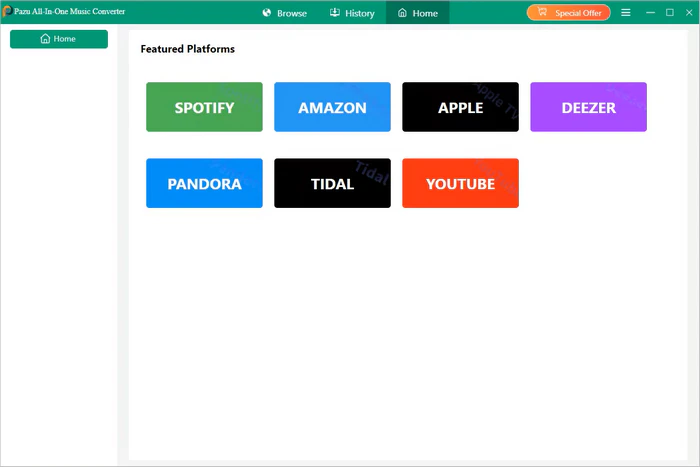

Supported Streaming Platforms
- Pazu All In One Music Converter currently supports the following streaming services out of the box.
- Spotify is the most widely used music platform globally and Pazu lets you download individual tracks, full albums, artist discographies, curated playlists, and podcast episodes from it using either a free or premium Spotify account.
- Apple Music integration allows users to download songs, albums, and playlists from the Apple ecosystem without needing an Apple device. This is particularly useful for Windows users who want access to Apple Music exclusives in a locally stored format.
- Amazon Music support covers both Amazon Music Unlimited and Amazon Prime Music libraries, letting you convert Amazon streams to standard audio formats that play on any device.
- YouTube Music contains one of the largest catalogs of both official releases and independent uploads. Pazu extracts audio directly from YouTube Music at your chosen quality setting.
- Tidal is known for its Hi Fi and Master quality streams. Pazu preserves that lossless quality when downloading from Tidal, making it the best option for audiophiles who want uncompressed audio files.
- Deezer support lets you download from one of Europe’s largest streaming catalogs including Flow mixes, playlists, and albums.
- Pandora downloads are also supported, including both on demand tracks available to Pandora Premium subscribers and station recordings.
- Additional platforms may be supported depending on the version you install. The developer regularly updates platform compatibility as streaming services update their infrastructure.
Output Audio Formats Supported
- One of the defining strengths of Pazu All In One Music Converter is the breadth of output formats it supports. Rather than locking you into a single output type, the software lets you choose the format that best suits your use case.
- MP3 is the most universally compatible lossy audio format and is the best choice for playback on older devices, car stereos, basic Bluetooth speakers, and any platform that does not support newer codecs. Pazu outputs MP3 at your preferred bitrate.
- AAC is a higher efficiency lossy codec used natively by Apple devices and YouTube. It offers better sound quality than MP3 at identical file sizes, making it a smart choice for iPhone and iPad users.
- M4A is Apple’s container format for AAC audio and is the default download format from Apple Music. Pazu uses this format when you want native Apple Music quality output.
- FLAC is a lossless audio format that compresses audio without any quality loss. FLAC files are significantly larger than MP3 or AAC but are bit for bit identical to the original studio recording. Music enthusiasts, audio engineers, and home theater users typically prefer FLAC.
- WAV is an uncompressed lossless format that offers the highest possible audio fidelity with no compression at all. WAV files are the largest in size but deliver the cleanest signal, making them ideal for professional audio editing.
- AIFF is Apple’s equivalent of WAV and is the standard uncompressed format used in professional Mac based audio production environments. Pazu supports AIFF output for users working in Logic Pro or other professional DAW software.
Key Features of Pazu All In One Music Converter 3.1.1
Universal Multi Platform Downloading
The most important feature of Pazu is its ability to handle multiple streaming services inside a single application. You do not need a separate Spotify downloader, a separate Apple Music converter, and a separate Tidal ripper. One installation handles all of them. This consolidation saves significant disk space, reduces system overhead, and simplifies your workflow considerably.
Lossless and Original Quality Preservation
When you download from a streaming service Pazu captures audio at the original quality delivered by the platform. For standard streaming services this means high bitrate AAC or OGG Vorbis equivalent to the highest quality setting available on that platform. For Tidal Masters and Tidal HiFi, Pazu preserves the MQA or lossless FLAC stream intact. The result is that your downloaded files are sonically indistinguishable from what you hear through the streaming app itself.
10X Faster Conversion Speed
Pazu uses a proprietary batch processing engine that converts and downloads audio at up to ten times real time speed. This means a ten minute song downloads and converts in approximately one minute rather than requiring you to wait the full playback duration. For large playlist exports or album collections containing hundreds of tracks this speed advantage translates into hours saved.
Metadata and ID3 Tag Preservation
Every downloaded file retains its complete set of metadata automatically. This includes the track title, artist name, album name, release year, genre, track number, disc number, and album artwork. Metadata is embedded using the standard ID3 tag format for MP3 files and equivalent tag formats for AAC, FLAC, WAV, and AIFF. Because tags are preserved correctly your music player will automatically sort and display your library without requiring any manual tagging work after the download.
Built In Web Player for Direct Browsing
Pazu includes a fully functional built in web player that connects directly to each supported streaming service. This means you can search for artists, browse playlists, preview tracks, and queue downloads all from within the Pazu interface. You do not need to have the Spotify desktop app, Apple Music app, or any other streaming client installed separately on your computer.
Works with Free and Premium Streaming Accounts
Pazu is compatible with both free tier and premium tier accounts on supported platforms. You simply log in to the streaming service using your existing credentials inside the Pazu interface. Free account users may experience some platform imposed limitations such as shuffle only playback on Spotify Free, but premium account users get full on demand access to the complete library with no restrictions.
Permanent Offline Storage Independent of Subscriptions
Once a track is downloaded by Pazu it exists as a standard audio file on your hard drive. It will continue to play using any media player even after your streaming subscription ends, even if the platform removes the song from its catalog, and even when you have no internet connection. This is fundamentally different from the offline downloads offered by streaming apps themselves, which encrypt files and delete them automatically when your subscription lapses.
Ad Free Output
Downloads produced by Pazu contain no advertisements, no audio watermarks, and no digital rights management restrictions. The output files are clean standard audio files that play in any compatible media player on any operating system.
Clean Software with Lifetime Updates
Pazu ships with no bundled adware, no toolbars, no third party installers, and no background telemetry processes. The developer provides free lifetime software updates so you always have compatibility with the latest versions of supported streaming platforms. Technical support is also included with your license at no additional cost.
System Requirements
- Pazu All In One Music Converter 3.1.1 requires Windows 10 or Windows 11 for PC users. Mac users need macOS 10.14 Mojave or later. The software is a 64 bit application and requires a minimum of 4 GB of RAM, though 8 GB or more is recommended for smooth batch processing of large playlists. You will need a stable internet connection to access streaming platforms and sufficient local storage for your downloaded audio files.
- FLAC and WAV downloads in particular can consume significant drive space compared to MP3 outputs.
Technical Specifications
The current version is Pazu All In One Music Converter 3.1.1. The developer is PazuSoft. The installation file size is approximately 245 MB. The software is multilingual and supports English, Chinese, Japanese, German, French, and several other languages. The license is a full commercial version. Supported operating systems are Windows 10 and Windows 11 for PC, and macOS 10.14 and above for Mac.
Who Should Use Pazu All In One Music Converter
Pazu is most useful for music enthusiasts who subscribe to multiple streaming services and want a unified tool to build an offline library. It is also ideal for travelers and commuters who need reliable offline playback without depending on mobile data. Audio professionals who want to reference streaming releases in a standard uncompressed format for mixing or mastering work will benefit from the FLAC and WAV output options. Podcast listeners who want to permanently archive episodes from streaming platforms will find the podcast download support particularly valuable.
Anyone who is approaching the end of a streaming subscription and wants to preserve their saved music before canceling should use Pazu to export their library first.
How Pazu Compares to Alternative Music Converters
Most competing music converters focus on a single streaming platform. TunesKit Spotify Converter, for example, handles only Spotify. Sidify Apple Music Converter handles only Apple Music. NoteBurner Tidal Music Converter handles only Tidal. Each of these requires a separate purchase and installation. Pazu consolidates all of these capabilities into one application, which simplifies management and typically offers better value when you subscribe to two or more streaming services.The built in web player is another meaningful differentiator. Most competitors require you to have the official streaming client installed and running in the background.
Pazu eliminates that dependency entirely, which reduces memory consumption and avoids potential conflicts between multiple large applications running simultaneously.On conversion speed, Pazu’s 10X acceleration is competitive with the fastest alternatives on the market. Most free tools convert at real time or slower, meaning a 60 minute album takes 60 minutes or more to download. Pazu completes the same task in approximately six minutes.
Frequently Asked Questions About Pazu All In One Music Converter
Does Pazu work with Spotify Free accounts?
Yes. Pazu works with both Spotify Free and Spotify Premium. Free users can download tracks that are available to them based on Spotify’s free tier rules.
Does Pazu preserve album artwork?
Yes. Album artwork is embedded directly into every downloaded file using the standard cover art tag. It appears correctly in iTunes, Windows Media Player, VLC, foobar2000, and all other major media players.
Can I download entire playlists at once?
Yes. Pazu supports batch downloading of entire playlists, albums, and podcasts in a single operation. You paste the playlist URL or find it through the built in web player and Pazu queues all tracks for download automatically.
Is the downloaded audio quality the same as streaming quality?
Yes, for equivalent settings. Pazu captures audio at the highest quality available from the streaming platform. For lossless services like Tidal HiFi the output is lossless. For standard services like Spotify the output matches the highest streaming bitrate that platform offers.
Does the software require an active internet connection?
An internet connection is required during the download process to access the streaming platform. After downloading, your files play locally without any internet connection.
Will the files continue to work after my subscription ends?
Yes. Downloaded files are standard audio files stored on your local drive. They are not encrypted or time limited and will play indefinitely regardless of your subscription status.
Conclusion
Pazu All In One Music Converter 3.1.1 is the most comprehensive multi platform streaming music downloader available in 2026. Its ability to handle Spotify, Apple Music, Amazon Music, YouTube Music, Tidal, Deezer, and Pandora from a single interface eliminates the need for multiple specialized tools. The combination of lossless output quality, 10X conversion speed, full metadata preservation, and a built in web player makes it significantly more capable than most single platform alternatives. If you want to build a permanent, organized, high quality local music library from your streaming subscriptions, Pazu All In One Music Converter is the most efficient tool available for that purpose.
