
Hasleo BitLocker Anywhere is a professional disk encryption software that brings full BitLocker functionality to Windows editions that Microsoft officially does not support. If you are running Windows 10 Home, Windows 8.1 Home, Windows 8 Home, or Windows 7 Professional, you already know that BitLocker Drive Encryption is locked out by Microsoft on those editions. Hasleo BitLocker Anywhere solves this problem completely by letting you encrypt hard drives, SSDs, USB flash drives, SD cards, and CF cards with the same military-grade encryption that enterprise users enjoy.
This guide covers everything you need to know about Hasleo BitLocker Anywhere version 9.9.0.2, including its full feature set, system requirements, supported file systems, encryption modes, and how it compares to the built-in Windows BitLocker tool.
What Is Hasleo BitLocker Anywhere?
Hasleo BitLocker Anywhere is a third-party Windows utility developed by EasyUEFI Technology. It is designed specifically for home and professional Windows users who cannot access the native BitLocker Drive Encryption feature due to operating system edition restrictions. The software replicates the complete BitLocker experience and adds additional controls, including the ability to choose your encryption algorithm, encryption mode, and key management options.
The software supports three commercial editions: Professional, Enterprise, and Technician. Each edition targets a different user type, from individual home users to IT administrators managing multiple machines.
Why Windows Home Users Need Hasleo BitLocker Anywhere?
Microsoft restricts BitLocker Drive Encryption to Windows Pro, Enterprise, and Education editions. This means that the millions of users running Windows 10 Home or Windows 8.1 Home have no built-in way to use BitLocker. Even Windows 7 Professional users are excluded from the full BitLocker experience.
Without BitLocker, sensitive data on your hard drive, SSD, or removable storage remains unencrypted. If your laptop is stolen or your USB drive is lost, anyone can access your files without any authentication. Hasleo BitLocker Anywhere bridges this gap by providing identical BitLocker encryption capabilities regardless of which Windows edition you are running.
Key Features of Hasleo BitLocker Anywhere 9.9.0.2
Full Drive Encryption with BitLocker
Hasleo BitLocker Anywhere lets you encrypt any supported drive using BitLocker technology on Windows editions where Microsoft restricts this feature. You can encrypt internal hard drives, SSDs, external USB drives, SD cards, and CF cards. The software supports FAT12, FAT16, FAT32, exFAT, and NTFS file systems. When encrypting a drive, you have the following options available to you. You can choose between used-space-only encryption, which is faster and encrypts only the space that currently contains data, or full-drive encryption, which encrypts every sector on the drive for maximum security. You can select your encryption strength, choosing between 128-bit AES and 256-bit AES. For most home users, 128-bit AES is more than sufficient. For users handling highly sensitive data, 256-bit AES provides a stronger security margin. You can also select your encryption mode.
AES-CBC (Cipher Block Chaining) is the compatible mode that works across all Windows versions. XTS-AES is the newer mode introduced in Windows 10 version 1511 that provides stronger integrity protection but is only compatible with drives used on Windows 10 and later. For fixed internal drives, XTS-AES is recommended. For removable drives that may be used on older systems, AES-CBC is the safer choice. Additionally, the software allows you to encrypt both Windows system partitions and data partitions.
You can also configure your encrypted Windows 7 installation to boot using a password, which provides full-system protection before the operating system loads.
BitLocker Drive Decryption
If you ever need to remove encryption from a drive, Hasleo BitLocker Anywhere provides a straightforward decryption workflow. You can decrypt any BitLocker-encrypted drive that was encrypted with the software or with the native Windows BitLocker tool. This cross-compatibility ensures that you are never locked into a proprietary format. Supported file systems for decryption include FAT12, FAT16, FAT32, exFAT, and NTFS on Windows 10, 8.1, 8, and 7 Home and Professional editions.
Password Management for Encrypted Drives
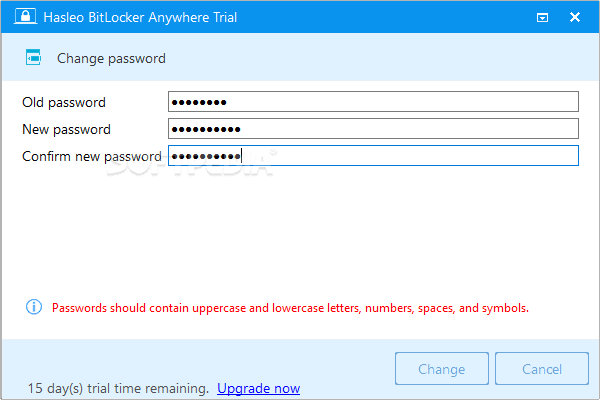
Changing the password on a BitLocker-encrypted drive is fully supported. If you need to update your encryption password, you can do so without decrypting and re-encrypting the entire drive. This saves significant time on larger drives and ensures that your data remains protected during the password change process.
BitLocker Recovery Key and Startup Key Export
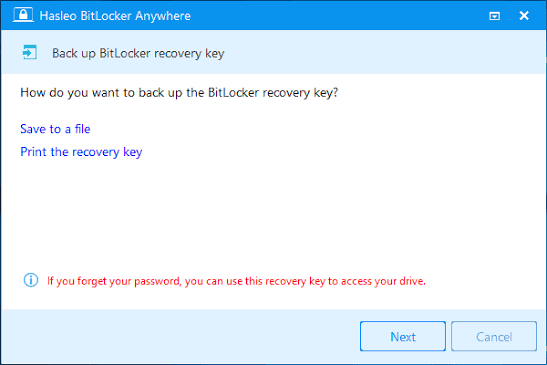
One of the most critical aspects of any encryption setup is key management. If you forget your password, the recovery key is the only way to regain access to your encrypted data. Hasleo BitLocker Anywhere lets you export the BitLocker recovery key from any encrypted drive. For Windows system partition encryption, you can also export the startup key, which is stored as a BEK file.
Always store your recovery key in a safe location that is separate from the encrypted drive itself, such as a printed document in a secure location, a USB drive stored separately, or a trusted cloud storage service.
Lock and Unlock Encrypted Drives
Beyond the core encryption operations, Hasleo BitLocker Anywhere provides simple lock and unlock functionality. You can lock an encrypted drive to prevent access without the password, and unlock it when you need to access the data. This is particularly useful for external drives that you share between trusted and untrusted environments.
Supported Operating Systems and File Systems
Hasleo BitLocker Anywhere 9.9.0.2 is compatible with the following Windows versions.
- Windows 11, Windows 10, Windows 8.1, Windows 8, Windows 7, Windows Server 2019, Windows Server 2016, Windows Server 2012, and Windows Server 2008 R2 are all supported. Both 32-bit and 64-bit architectures are supported where applicable.
- The supported file systems are FAT12, FAT16, FAT32, exFAT, and NTFS. These cover virtually all commonly used drive formats in consumer and professional environments.
System Requirements
To run Hasleo BitLocker Anywhere 9.9.0.2 on your computer, your system must meet the following minimum specifications.
- Your processor must be at least 1 GHz and can be either 32-bit or 64-bit. You need a minimum of 512 MB of RAM, though 1024 MB or more is recommended for smoother performance. You must have at least 1024 MB of free disk space available for the installation. Your operating system must be one of the supported Windows versions listed above.
Technical Details
- The current version is Hasleo BitLocker Anywhere 9.9.0.2. Available editions include Professional, Enterprise, and Technician. The software is developed by EasyUEFI Technology and is available as a full licensed version. The primary language is English and it is a Windows-only application.
Hasleo BitLocker Anywhere vs Native Windows BitLocker?
Many users wonder how Hasleo BitLocker Anywhere compares to the BitLocker feature built into Windows Pro and Enterprise editions. The answer is that they are functionally equivalent in the core encryption, decryption, lock, and unlock operations. Both use the same AES encryption algorithms and the same BitLocker key management structure, which means drives encrypted with one tool can be managed with the other.
The key advantage of Hasleo BitLocker Anywhere is that it brings this functionality to Windows editions where it is not natively available. The additional benefit is the explicit control over encryption strength and mode during the encryption setup, which the native BitLocker interface does not always expose in a user-friendly way.
How to Use Hasleo BitLocker Anywhere?
Using Hasleo BitLocker Anywhere is straightforward. After installation, you open the application and it displays all detected drives on your system. You select the drive you want to encrypt, click the Encrypt Drive button, and then follow the wizard. You will set a password, optionally save a recovery key, choose your encryption strength and mode, and then begin the encryption process.
The encryption process runs in the background and you can monitor its progress from the main interface. On an average system, encrypting a 128 GB drive with used-space-only encryption takes a few minutes, while full-drive encryption on a large mechanical hard drive may take several hours.
For day-to-day use, encrypted drives that have been unlocked behave exactly like normal drives. The encryption and decryption happen transparently at the driver level, so there is no noticeable performance impact during normal file operations.
Is Hasleo BitLocker Anywhere Safe to Use?
Hasleo BitLocker Anywhere uses the same encryption standards as Microsoft’s own BitLocker implementation. AES-128 and AES-256 are both widely recognized encryption standards that have been thoroughly vetted by the security community. The software does not store your password anywhere on your system, and the recovery key is only accessible to you.
As with any encryption software, the most important safety consideration is key management. If you lose both your password and your recovery key, there is no way to recover your data. This is by design and is the fundamental property that makes encryption effective.
Frequently Asked Questions
Can Hasleo BitLocker Anywhere encrypt a USB drive?
Yes, you can encrypt USB flash drives, external hard drives, SD cards, and CF cards using Hasleo BitLocker Anywhere, in addition to internal hard drives and SSDs.
Will drives encrypted with Hasleo BitLocker Anywhere work on Windows Pro or Enterprise?
Yes. Because the software uses the standard BitLocker encryption format, any drive encrypted with Hasleo BitLocker Anywhere can be unlocked and managed on any Windows version that supports BitLocker, including Windows Pro, Enterprise, and Education.
What happens if I forget my BitLocker password?
If you forget your password, you can use the recovery key that was generated when you encrypted the drive to regain access. This is why exporting and safely storing the recovery key is a critical step that should never be skipped.
Does Hasleo BitLocker Anywhere support Windows 11?
Yes, the software fully supports Windows 11 in addition to Windows 10, 8, 7, and Windows Server editions.
What is the difference between AES-CBC and XTS-AES encryption modes?
AES-CBC is an older and more compatible mode that works across all supported Windows versions. XTS-AES is a newer, more secure mode that provides additional integrity protection but requires Windows 10 version 1511 or later. For fixed drives on modern systems, XTS-AES is preferred. For removable drives used across older systems, AES-CBC ensures broader compatibility.
Software Information Summary
Software Name: Hasleo BitLocker Anywhere 9.9.0.2 Developer: EasyUEFI Technology Available Editions: Professional, Enterprise, Technician Supported OS: Windows 11, 10, 8.1, 8, 7, Server 2008 R2 through 2019 Supported File Systems: FAT12, FAT16, FAT32, exFAT, NTFS Encryption Standards: AES-128-CBC, AES-256-CBC, AES-128-XTS, AES-256-XTS Minimum RAM: 512 MB (1024 MB recommended) Minimum CPU: 1 GHz (32-bit or 64-bit) Minimum Disk Space: 1024 MB free Language: English Architecture: 32-bit and 64-bit
Conclusion
Hasleo BitLocker Anywhere 9.9.0.2 is an essential utility for any Windows Home user who needs reliable, standards-compliant drive encryption. By bringing the full power of BitLocker to editions of Windows that Microsoft restricts it from, the software ensures that data security is not a privilege limited to Pro and Enterprise users. Its support for multiple encryption algorithms, encryption modes, key export, and cross-compatibility with native Windows BitLocker makes it one of the most capable and trustworthy disk encryption tools available for Windows.
Whether you are looking to protect a personal laptop, secure a USB drive full of sensitive documents, or encrypt a Windows 7 system partition, Hasleo BitLocker Anywhere provides the tools to do it effectively and safely.
