

Photo Organizer AI Premium is a powerful desktop application for Windows that uses local artificial intelligence to automatically scan, sort, and organize thousands of scattered photos into clean, structured event albums. It detects duplicate images, removes low quality shots, classifies scenes and subjects, and groups photos by date and event without uploading anything to the cloud. Whether you are a professional photographer managing a large client library or a casual user with years of disorganized pictures on your hard drive, Photo Organizer AI brings order to your entire photo collection in minutes.
What Is Photo Organizer AI Premium?
Photo Organizer AI Premium is a professional photo culling and organization tool developed by ByteCar. It runs entirely offline on your Windows PC using embedded ONNX deep learning models and DirectML GPU acceleration. The software intelligently clusters your photos into virtual event albums based on chronological groupings, detects blurry or grainy images, finds identical and near-duplicate files, and classifies scenes such as mountains, water, documents, and portraits automatically.
Version 5.1.7 is the latest release, compatible with Windows 10 and Windows 11 on 64-bit systems. A portable edition is also available for users who prefer to run the software directly from a USB drive without installation.
Key Features of Photo Organizer AI Premium 5.1.7
AI Subject and Scene Classification
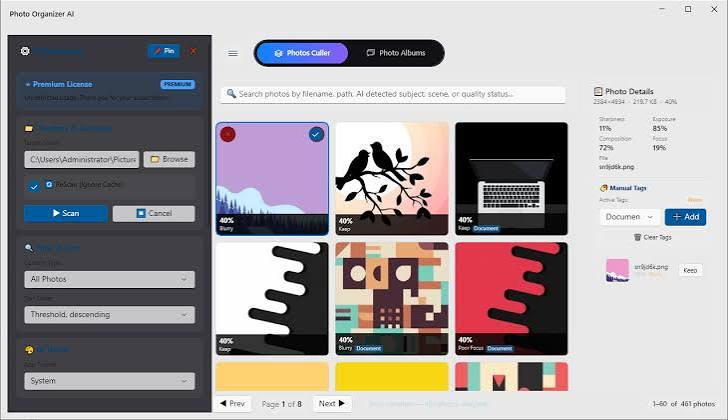
Photo Organizer AI uses embedded local ONNX classifiers to automatically recognize and tag the content of each photo. It identifies subjects and classifies scene types including mountains, beaches, forests, water bodies, cityscapes, documents, food, and portraits. This semantic tagging allows you to filter and search your library by content rather than just by date or filename, making it far easier to locate a specific type of photo in a large collection.
Virtual Event Albums
One of the most useful features in Photo Organizer AI is its virtual event album system. The software groups your photos chronologically and clusters images taken around the same time into separate event albums representing occasions like weddings, vacations, birthday parties, and daily outings. These albums are virtual, meaning they do not move or rename your original files on disk. You can split, merge, rename, and reorganize these virtual albums freely without affecting your underlying folder structure.
Identical and Near Duplicate Detection
Photo Organizer AI scans every image in your selected directories and compares them using both exact file checksum matching and high level visual similarity analysis. Exact duplicates are files that are byte for byte identical copies stored in multiple locations. Near duplicates are visually similar photos taken in quick succession, such as burst shots from a single moment. The software groups all duplicates together and lets you review them side by side so you can keep the sharpest, best exposed, or best composed version and delete the rest.
Blur and Focus Quality Inspection
The application automatically evaluates the technical quality of each photo using deep learning based analysis. It detects images that are blurry, out of focus, grainy due to high ISO noise, or affected by red eye. You can set a custom quality threshold using a slider control, and any photos that fall below your chosen standard are flagged for review or automatic removal. This feature is especially valuable for photographers who shoot in burst mode or who want to quickly cull thousands of event photos down to only the keepers.
DirectML GPU Acceleration
All deep learning inference in Photo Organizer AI runs locally on your machine using Microsoft DirectML, which allows the application to take full advantage of your GPU regardless of whether it is from NVIDIA, AMD, or Intel. This means the culling and classification processes run significantly faster than CPU only alternatives, making it practical to process libraries of tens of thousands of photos in a single session without long wait times.
100 Percent Local and Private Processing
Photo Organizer AI performs all analysis, scanning, duplicate detection, classification, and file management entirely on your local computer. No photos are ever uploaded to any cloud server. No internet connection is required after installation. This makes the software suitable for photographers handling sensitive client work, personal archives, or any situation where privacy and data security are priorities.
Portable Edition Available
The portable version of Photo Organizer AI Premium runs directly from a USB flash drive or any folder on your PC without requiring installation. It does not write to the Windows registry, does not leave behind leftover configuration files, and does not modify your system settings in any way. This makes it an excellent option for users who work across multiple computers, maintain a clean system, or simply prefer not to install additional software permanently.
Who Should Use Photo Organizer AI Premium?
Photo Organizer AI Premium is well suited for several types of users. Professional photographers who shoot weddings, events, or portrait sessions often return from a single job with thousands of raw images that must be culled and organized before editing can begin. Photo Organizer AI automates the first pass of this process, grouping shots by event and flagging the blurry or redundant frames so the photographer can focus on selecting and editing only the best work. Families and casual users who have accumulated years of photos from smartphones, cameras, and various devices often face a disorganized library spread across multiple folders with inconsistent naming. Photo Organizer AI scans all of those directories at once, identifies duplicate copies that have accumulated over time, and creates a logical event based structure that makes the collection easy to browse and enjoy.
Digital collectors and archivists managing large historical or media photo libraries benefit from the automated scene classification and near duplicate detection, which can surface redundant copies and mislabeled content across massive file sets.
System Requirements
Photo Organizer AI Premium 5.1.7 requires the following minimum configuration.
- Operating system: Windows 10 or Windows 11, 64-bit only. Processor: A modern multi-core CPU is recommended for acceptable performance without GPU acceleration. GPU: Any DirectML compatible graphics card from NVIDIA, AMD, or Intel will unlock GPU accelerated processing for significantly faster analysis. Storage: Sufficient free disk space to accommodate the 420 MB installer or the 394 MB portable package, plus working space for temporary analysis data. RAM: At least 8 GB of system memory is recommended for processing large photo libraries.
Photo Organizer AI Premium vs Manual Photo Organization
Manual photo organization typically requires opening each folder, visually inspecting images, dragging files between directories, and building album structures by hand. For a library of even a few thousand photos this process can take hours or days. Identifying duplicates manually is nearly impossible at scale, and recognizing blurry or poor quality shots requires opening each file individually.
Photo Organizer AI replaces this workflow with automated analysis that processes thousands of images in a fraction of the time. The AI detects issues that are easy to miss during manual review, such as subtle motion blur, slight defocus, or near duplicate frames that differ by only a few pixels. The virtual album system means you can reorganize your entire library structure without making destructive changes to your original files, giving you confidence to experiment with different organizational approaches.
How to Use Photo Organizer AI Premium?
Using Photo Organizer AI is straightforward. After launching the application, you point it at one or more folders on your computer that contain photos. The software scans those directories and begins its analysis using the embedded AI models. Within minutes it presents you with a set of virtual event albums, a list of detected duplicates grouped for comparison, and a quality report highlighting blurry, grainy, or otherwise substandard images. You review each category, make decisions about which files to keep or remove, and apply your choices. Your original files are only modified or deleted when you explicitly confirm the action.
Frequently Asked Questions About Photo Organizer AI
Does Photo Organizer AI upload my photos to the cloud?
No. All processing happens entirely on your local computer. No photos or metadata are sent to any external server.
Does the software support RAW image formats?
Photo Organizer AI is primarily designed for JPEG and common image formats. Users with large RAW archives should check the developer documentation for specific format support details.
Is the portable version as fully featured as the installed version?
Yes. The portable edition contains all the same features and capabilities as the installed Premium version. The only difference is that it runs without requiring installation or registry changes.
Can I undo changes made by Photo Organizer AI?
Because Photo Organizer AI uses a virtual album system, reorganization actions do not move your physical files until you confirm them. Deletions of duplicates or low quality photos should be reviewed carefully before confirming, as these actions affect your actual files on disk.
What is the difference between identical duplicates and near duplicates?
Identical duplicates are exact byte for byte copies of the same file stored in different locations. Near duplicates are visually similar images such as burst shots, slightly reframed versions of the same scene, or photos taken seconds apart. Photo Organizer AI detects both types separately so you can review each category with the appropriate level of care.
Technical Details
- Software name: Photo Organizer AI Premium 5.1.7 Developer: ByteCar Platform: Windows 10, Windows 11 (64-bit) License type: Full premium version Interface language: English Installer file size: 420 MB Portable file size: 394 MB GPU acceleration: DirectML (NVIDIA, AMD, Intel compatible) AI engine: Embedded local ONNX classifiers Internet connection required: No
Conclusion
Photo Organizer AI Premium 5.1.7 is one of the most capable local AI photo management tools available for Windows in 2026. Its combination of event based album clustering, near duplicate detection, scene classification, and GPU accelerated quality analysis covers the full range of tasks involved in transforming a chaotic photo library into a well structured, searchable collection. Because all processing happens on your own hardware with no cloud dependency, it is equally suitable for privacy conscious personal users and professional photographers handling confidential client work. If you have a growing backlog of unorganized photos and want an automated solution that respects your privacy, Photo Organizer AI Premium delivers a level of intelligent organization that manual sorting simply cannot match.
