
Aiarty Image Enhancer is an advanced AI-powered photo enhancement software developed by Aiarty that uses deep learning models to denoise, deblur, upscale, and reconstruct images with remarkable precision. Whether you are a professional photographer, a graphic designer, a digital artist, or someone who simply wants sharper vacation photos, Aiarty Image Enhancer delivers results that traditional editing tools cannot match. In this complete review, you will learn everything about its features, AI models, use cases, system requirements, pros and cons, and how it compares to alternatives.
What Is Aiarty Image Enhancer?
Aiarty Image Enhancer is a Windows-based desktop application that applies generative AI technology to transform low-quality, blurry, noisy, or low-resolution images into crisp, high-detail visuals. Unlike conventional sharpening or upscaling tools that simply interpolate pixels, Aiarty uses trained neural networks to intelligently reconstruct missing detail, restore textures, and scale images up to 8x their original size while achieving resolutions as high as 32K.
The software is especially well-suited for working with AI-generated images from platforms like Stable Diffusion and MidJourney, where outputs can sometimes appear soft, over-smoothed, or lacking fine texture. It is equally effective on real-world photographs, scanned documents, old family photos, and compressed JPEG files that have suffered from quality loss over time.
Key Features of Aiarty Image Enhancer
Generative AI Enhancement Engine
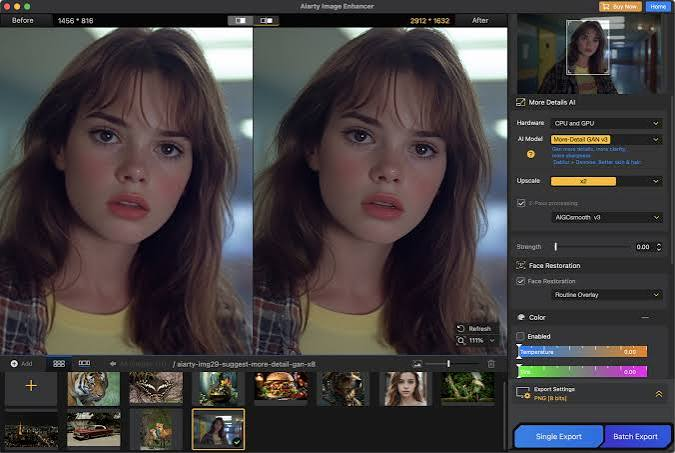
The core of Aiarty Image Enhancer is its generative AI engine, which does not simply enlarge pixels but actively generates new visual information based on learned patterns from millions of images. This means the software can take a blurry 480p photo and produce a sharp, detail-rich image that looks as though it was captured at a much higher resolution. The generative model adds plausible texture, edge definition, and fine detail rather than introducing the blurring artifacts seen in traditional upscaling methods.
Three Specialized AI Upscaling Models
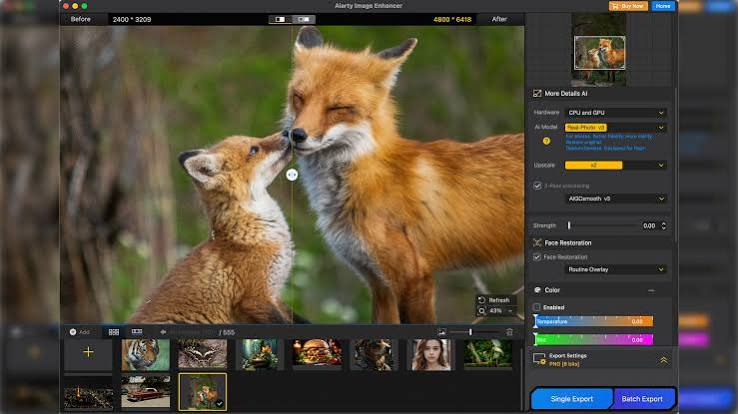
Aiarty Image Enhancer ships with three distinct AI models, each optimized for a different type of image or use case. The first model is designed for AI-generated artwork and illustrations. It understands the visual language of diffusion models and MidJourney outputs, enhancing them without overprocessing or distorting the stylistic elements that make AI art visually distinctive. The second model is built for real-world photographs. It handles skin tones, hair detail, foliage, architecture, and other natural textures with a level of accuracy that preserves the authenticity of the original scene while dramatically improving sharpness and clarity.
The third model focuses on restoring degraded images such as old scanned photographs, heavily compressed JPEGs, and footage frames with significant noise or blocking artifacts. It reconstructs damaged or missing pixel information using contextual inference from surrounding areas.
Upscaling Up to 8x at 32K Resolution
Aiarty Image Enhancer supports image upscaling at 2x, 4x, and 8x magnification levels. The 8x upscaling option allows users to take a small or medium resolution source image and output a file with enough pixel density for billboard printing, large format displays, or professional publishing workflows. The maximum supported output resolution is 32K, which places Aiarty in the same performance tier as Hollywood-level production tools used for film and broadcast post-production.
AI Denoising and Deblurring
Noise and blur are among the most common problems that reduce image quality, especially in photos taken in low light or with camera shake. Aiarty uses dedicated AI processing to identify and remove luminance noise, color noise, and motion blur without softening edges or washing out colors. The denoising engine goes beyond simple noise reduction by reconstructing the underlying image data that the noise was obscuring, resulting in a cleaner final image that retains sharpness and contrast.
Detail Restoration for Skin, Hair, and Texture
One of the most visually impressive aspects of Aiarty Image Enhancer is its ability to restore and enhance fine micro-details. The software specifically recognizes and improves skin pores and tones, individual hair strands, fabric weave patterns, leaf veins, architectural details, and surface textures. This makes it an ideal choice for portrait photographers, product photographers, and anyone who needs their subjects to look as natural and detailed as possible in the final output.
JPEG Artifact Removal
Years of compression have left countless photos with visible blocking artifacts, color banding, and loss of tonal gradation. Aiarty Image Enhancer targets these JPEG-specific problems directly, smoothing out compression blocks and restoring color accuracy while maintaining or improving overall sharpness. This is particularly useful for photographers who shot in JPEG format early in their careers or who receive client images that have been compressed multiple times.
Portable Version Available
Aiarty Image Enhancer also comes in a portable version that requires no installation. The portable edition can be stored on a USB flash drive and run on any compatible Windows machine without leaving files behind on the host system. This makes it an excellent solution for photographers who work across multiple computers, travel frequently, or prefer a clean system without installed software.
Who Should Use Aiarty Image Enhancer?
Aiarty Image Enhancer is a versatile tool that benefits a wide range of users. Professional photographers working in portraiture, wedding photography, or editorial photography will find the skin and hair enhancement features valuable for client deliverables that need to hold up at large print sizes. Digital artists and AI image creators using Stable Diffusion, MidJourney, DALL-E, or similar platforms will benefit from the AI-art-specific model that enhances generated outputs without disrupting their unique visual style. Video game asset designers and concept artists who need to scale up textures or reference images for use in high-resolution production pipelines can rely on Aiarty to maintain quality through large magnification steps.
Archivists and genealogists who work with old, damaged, or low-resolution scanned photographs will find the restoration model effective at recovering detail from degraded source material. Content creators and social media marketers who need sharp, high-quality images for websites, thumbnails, advertisements, and printed marketing materials will find Aiarty reduces the time needed for manual retouching.
How Aiarty Image Enhancer Compares to Alternatives?
The AI image enhancement market includes several notable competitors including Topaz Gigapixel AI, Adobe Photoshop Super Resolution, Let’s Enhance, and Luminar Neo. Aiarty Image Enhancer stands out among these options for several reasons. Unlike web-based tools such as Let’s Enhance, Aiarty processes images locally on your own hardware, which means no file size limits, no subscription fees for cloud processing, and no privacy concerns about uploading sensitive client images to a third-party server.
Compared to Topaz Gigapixel AI, Aiarty offers specialized support for AI-generated artwork, which Topaz does not specifically address. Both tools support high upscaling ratios, but Aiarty’s three-model approach allows users to select the most appropriate processing pipeline for their specific image type. Compared to Adobe Photoshop Super Resolution, Aiarty provides a more streamlined single-purpose workflow that does not require a full Creative Cloud subscription, making it far more accessible for users who do not need the full Photoshop toolkit.
System Requirements for Aiarty Image Enhancer
- Aiarty Image Enhancer runs on Windows operating systems. Because the software uses GPU-accelerated AI processing, a dedicated graphics card with sufficient VRAM will significantly improve processing speed. Images can also be processed on CPU alone, though render times will be longer. For users working with very large source files or batch processing workflows, a modern mid-range to high-end GPU is recommended for the best performance.
Supported Input and Output Formats
Aiarty Image Enhancer supports all major image formats as input including JPEG, PNG, TIFF, BMP, and WebP. Output files can be saved in high-quality formats that preserve the detail added during the enhancement process, making the workflow compatible with professional print and publishing pipelines.
Practical Use Cases for Aiarty Image Enhancer
Restoring old family photos that were scanned at low resolution is one of the most emotionally rewarding uses of the software. A single photo that was blurry and pixelated can be transformed into a sharp, printable image suitable for framing or sharing with family members. Upscaling product images for e-commerce is another high-value application. Online shoppers expect to be able to zoom into product photos, and poor-quality images damage trust and conversion rates. Aiarty can take a product photo shot at moderate resolution and upscale it cleanly for use in high-zoom product galleries. Enhancing video frame exports is useful for motion designers and video editors who need to extract a specific frame from footage and use it as a still image in print or web contexts.
AI upscaling compensates for the lower resolution of video compared to dedicated photography. Improving AI art for commercial use is increasingly relevant as businesses begin using AI-generated images in branding, advertising, and content creation. Aiarty ensures these outputs meet professional print quality standards before they go to press or into a final design layout.
Pros and Cons of Aiarty Image Enhancer
The strongest advantages of Aiarty Image Enhancer are its three purpose-built AI models for different image types, its industry-leading 8x upscaling capability with 32K resolution output, its offline local processing for privacy and speed, the availability of a portable version, and its targeted detail enhancement for skin, hair, and fine textures.
The main limitations are that it is currently available only for Windows with no macOS version, processing large files can take time even on capable hardware, and users who need cloud-based or browser-based tools for remote workflows will need an alternative solution.
Technical Specifications
- Aiarty Image Enhancer version 3.12 is a 64-bit application developed by Aiarty. The installer file size is approximately 333 MB, and the portable version is approximately 462 MB. The software is available as a full licensed version and supports the English language interface.
Frequently Asked Questions About Aiarty Image Enhancer
Is Aiarty Image Enhancer free?
Aiarty Image Enhancer is a paid licensed application, though it may be available through promotional or trial programs. A full license grants unrestricted access to all AI models and processing features.
Can Aiarty Image Enhancer enhance blurry photos?
Yes, the software includes dedicated AI-powered deblurring that reconstructs sharpness by analyzing surrounding pixel data and the patterns the model has learned from high-quality training images.
Does Aiarty work on AI-generated images from Stable Diffusion or MidJourney?
Yes. Aiarty Image Enhancer includes a specialized AI model built specifically for AI-generated artwork, making it one of the few enhancement tools designed with this use case in mind.
What is the maximum upscale factor supported?
Aiarty Image Enhancer supports upscaling up to 8x, enabling output at resolutions as high as 32K for very large print or display applications.
Is there a portable version?
Yes. A portable edition is available that does not require installation and can be run directly from a USB drive.
Final Verdict
Aiarty Image Enhancer is one of the most capable and specialized AI photo enhancement tools available for Windows users in 2026. Its combination of three purpose-optimized AI models, support for 8x upscaling at 32K resolution, dedicated AI-art enhancement, offline processing, and portable deployment options sets it apart from both general-purpose tools like Photoshop and competing dedicated upscalers. For photographers, digital artists, AI content creators, and archivists who regularly need to improve image quality beyond what capture hardware can deliver, Aiarty Image Enhancer is a powerful and efficient solution worth serious consideration.
