
GiliSoft USB Lock is a powerful endpoint data loss prevention tool for Windows that gives users complete control over USB ports, removable storage devices, optical drives, websites, and running applications from a single interface. Whether you are a home user trying to protect personal data or an IT administrator managing corporate workstations, GiliSoft USB Lock delivers comprehensive device access control without requiring technical expertise.
What Is GiliSoft USB Lock?
GiliSoft USB Lock is an Endpoint DLP (Data Loss Prevention) suite developed by GiliSoft. It works by enforcing access policies on physical ports and connected devices at the operating system level. Once installed on a Windows PC, it prevents unauthorized USB drives, external hard disks, Blu-ray discs, and other removable media from reading or writing data unless explicitly permitted by the administrator.
The software operates silently in the background and requires a password to modify its settings, which means even if someone attempts to uninstall or bypass it, they cannot without the correct credentials.
Key Features of GiliSoft USB Lock 11.2
USB Drive Blocking and Access Control
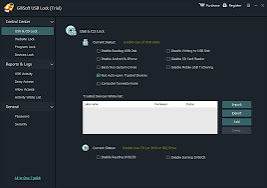
GiliSoft USB Lock blocks all types of USB storage devices by default. This includes standard USB flash drives, external hard drives, FireWire devices, Enhanced mini-USB connections, Host Controller Interface devices, Serial ATA drives, U3 smart drives, EHCI controllers, RAID controllers, and any storage device that is assigned a drive letter by Windows. Administrators can choose to block all USB devices entirely, restrict them to read-only mode, or whitelist specific authorized devices by their hardware ID so that only approved drives are allowed to connect.
CD, DVD, and Blu-ray Drive Management
The optical drive control module lets you disable reading from DVD and CD discs or set the physical drive to read-only mode so that burning is blocked. The software covers every optical format including CD-R, CD-RW, CD-RAM, DVD-R, DVD-RW, DVD-RAM, HD-DVD variants, Blu-ray-R, Blu-ray-RW, Blu-ray-RAM, floppy disks, and Zip drives. This is particularly useful in corporate environments where employees should not be able to copy sensitive documents onto optical media.
Website Filtering and Internet Access Control
The integrated website blocker works at the network filter level to prevent access to specific URLs or entire website categories. When a user attempts to visit a blocked website, they are redirected to a blank page or a custom blocked notice and the original page content is never loaded. This feature is commonly used by parents wanting to restrict adult content, gambling sites, or social media platforms, and by businesses needing to enforce acceptable use policies on company computers.
Application and Program Locking
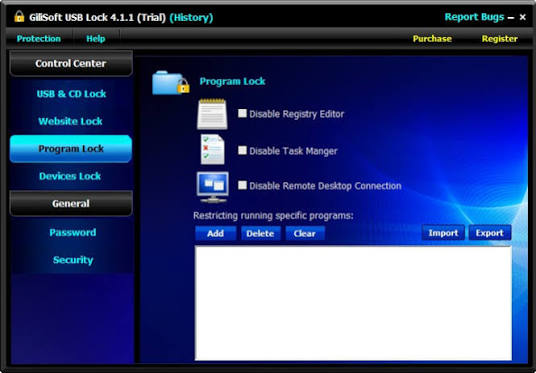
Administrators can prevent specific applications from launching on the system. This includes browsers like Internet Explorer, communication tools like Outlook and AOL Instant Messenger, and any custom executable. The Control Panel can also be locked with a single click to prevent system configuration changes. If a user attempts to open a blocked program, they see a customizable message explaining why access is denied. All locked programs remain listed in the interface so administrators can toggle them on or off instantly.
Device Port Restriction
Beyond USB and optical drives, GiliSoft USB Lock extends device control to printers, modems, COM and LPT serial ports, infrared ports, Bluetooth adapters, and IEEE 1394 FireWire ports. Each device type can be individually enabled or disabled, giving fine-grained control over what peripheral devices can communicate with the system.
Copy Protection and Data Leak Prevention
The software includes an advanced data leak prevention engine that blocks all attempts to copy files from the protected computer to unauthorized storage devices. This covers USB drives, external hard disks, CDs, DVDs, and any removable media not on the whitelist. The technology prevents unauthorized duplication of confidential documents, intellectual property, and copyrighted materials, making it a practical tool for businesses that handle sensitive client data or proprietary software.
Password Security and Wrong Entry Alerts
All settings within GiliSoft USB Lock are protected by a master password. If someone attempts to guess the password and enters the wrong value more than five consecutive times, the software automatically sends an email alarm notification to the registered administrator address. This brute-force protection ensures that unauthorized users cannot bypass the security policies through trial and error.
Who Should Use GiliSoft USB Lock?
GiliSoft USB Lock is suitable for several different user groups:
Home users who share a family computer benefit from the parental controls, website filtering, and the ability to prevent children from copying files or installing software from USB drives. Small business owners can use it to stop employees from leaking customer databases, financial records, or trade secrets by copying them onto personal USB drives or burning them to disc. IT administrators in larger organizations can deploy the software on workstations where users should not have unrestricted access to removable media, reducing the risk of both accidental data loss and intentional data theft.
Schools and libraries can use the website blocker and program lock to enforce appropriate use policies on shared computers without requiring complex group policy configurations.
System Requirements and Technical Details
- GiliSoft USB Lock 11.2 runs on Windows operating systems and does not require any additional runtimes or frameworks beyond a standard Windows installation. The installer package is approximately 10 MB in size, making it lightweight relative to the breadth of features it provides. The interface supports multiple languages, so it is accessible to users in different regions without requiring separate localized installations.
- The software is distributed as a full commercial version. Users can download the official installer from the GiliSoft website at gilisoft.com to evaluate it or purchase a license.
How GiliSoft USB Lock Compares to Windows Built-in Controls?
Windows does include some native tools for device management through Group Policy and Device Manager, but these require administrator-level technical knowledge, are not user-friendly, and do not include features like website filtering, program locking, email alerts for wrong password attempts, or a unified interface for managing all device types simultaneously. GiliSoft USB Lock consolidates all of these capabilities into a single application with a straightforward interface that any computer user can configure.
Benefits of Using an Endpoint DLP Solution Like GiliSoft USB Lock
Data breaches caused by removable media are among the most common and preventable forms of corporate information theft. According to cybersecurity research, a significant proportion of insider data theft incidents involve employees using USB drives or personal devices to copy files without authorization. An endpoint DLP tool like GiliSoft USB Lock addresses this risk at the hardware access level, which is more reliable than relying solely on user education or network-level security measures.
For home users, the ability to block websites and lock programs provides meaningful protection for children and shared computers in ways that browser-level parental controls alone cannot achieve, since browser controls can often be bypassed by simply switching to a different browser or using private browsing mode.
Frequently Asked Questions About GiliSoft USB Lock
Can GiliSoft USB Lock allow specific trusted USB drives while blocking all others?
Yes. The software supports device whitelisting by hardware ID, so you can authorize specific USB drives and block every other device by default.
Does GiliSoft USB Lock work on Windows 11?
GiliSoft USB Lock is compatible with Windows operating systems including recent versions. Check the official GiliSoft website for the most current compatibility information.
What happens if someone tries to uninstall GiliSoft USB Lock without the password?
The software is password protected. Attempting to uninstall or modify settings without the correct password is blocked by the application.
Does the website blocker work in all browsers?
The website blocking feature works at the network filter level and is not limited to a single browser. It applies system-wide regardless of which browser the user attempts to use.
Will GiliSoft USB Lock notify me if someone tries to tamper with the settings?
Yes. If an incorrect password is entered five or more times consecutively, the software sends an email alarm notification to the administrator’s registered email address.
Final Verdict
GiliSoft USB Lock 11.2 is a well-rounded endpoint security tool that addresses one of the most commonly overlooked attack vectors in personal and corporate computing: physical device access. Its combination of USB port control, optical drive management, website filtering, application blocking, and data leak prevention in a single lightweight package makes it a practical choice for users who want to protect sensitive data without deploying a complex enterprise security infrastructure. The password protection and email alert system add an extra layer of accountability, and the clean interface ensures that even non-technical users can configure and manage security policies effectively.
For anyone looking to secure a Windows PC against unauthorized data transfer, restrict internet access, or lock down peripheral device usage, GiliSoft USB Lock delivers a comprehensive and easy-to-use solution.
Software Details
Software Name: GiliSoft USB Lock 11.2 Developer: GiliSoft License: Commercial Full Version Language: Multilingual Operating System: Windows File Size: 10 MB Official Website: gilisoft.com
