
Secret Disk Professional is a lightweight Windows security tool developed by PrivacyRoot that lets you create hidden, password protected virtual drives on your PC within seconds. Unlike traditional encryption software, it does not encrypt your files or reformat your hard disk. Instead, it creates an additional virtual disk that becomes completely invisible to other users the moment you lock it. This makes it one of the fastest and most practical solutions for anyone who wants to keep personal, financial, or professional files private on a shared or public computer.
What Is Secret Disk Professional?
Secret Disk Professional is a Windows application that creates one or more virtual disk drives on your system. These drives appear in File Explorer just like any regular hard disk partition. You can store any files and folders on them, run installed programs from them, and manage them exactly as you would a normal drive. The key difference is that with a single click or a defined password, the entire disk and all its contents become invisible to anyone else using the machine.
The software is developed by PrivacyRoot and has been continuously updated. The latest version as of 2026 is Secret Disk Professional 2026 v323, which is available as a standard installer and as a portable edition. It supports Windows 7, 8, 10, and 11 and requires .NET Framework 4.5 or higher to run.
How Secret Disk Professional Works?
The core mechanism behind Secret Disk Professional is virtual disk technology combined with access restriction rather than file encryption. When you create a secret disk, the software ties a virtual drive to a set of physical files stored on your actual hard disk. This virtual drive is visible and accessible only when the software is running and the disk is unlocked with the correct password. When you lock the secret disk, the software removes the virtual drive from the Windows file system. It does not simply hide the drive letter in Disk Management. The disk and all its contents become completely absent from File Explorer, from the command prompt, and from any third party disk browsing tools. Anyone who looks at your system will see no trace of the drive or the files stored on it.
Because the information linking your virtual drive to its underlying files is stored in virtual memory during the active session, a sudden power outage or a fatal Windows crash will automatically lock and hide the secret disk. You do not need to manually lock it in an emergency. This automatic protection mechanism is one of the most practically useful safety features in the software.
Key Features of Secret Disk Professional
Secret Disk Professional offers a focused set of features built around one primary goal: giving you a completely private and invisible storage location on your Windows PC.
Instant Disk Visibility Control
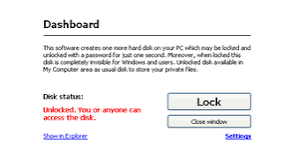
You can make any secret disk visible or invisible with a single click or keyboard shortcut. There is no waiting period, no scan, and no loading time. The transition from visible to invisible takes less than one second. This makes the software practical in real world situations where you may need to quickly hide sensitive files before handing your laptop to someone else.
Password Protection Without Encryption
The access restriction model used by Secret Disk Professional is fundamentally different from encryption tools like VeraCrypt or BitLocker. Rather than scrambling file data with a cryptographic algorithm, it restricts operating system level access to the virtual disk using a password. This approach has a significant performance advantage because there is no encryption or decryption overhead when reading and writing files. Large files open instantly with no noticeable slowdown.
The tradeoff is that the protection is access based rather than data based. If a technically advanced user were to extract the underlying storage files from your disk and analyze them outside of Windows, they might be able to recover data without the password. For the vast majority of use cases involving shared family PCs, workplace computers, or casual privacy needs, the protection level is more than sufficient.
No Disk Formatting Required
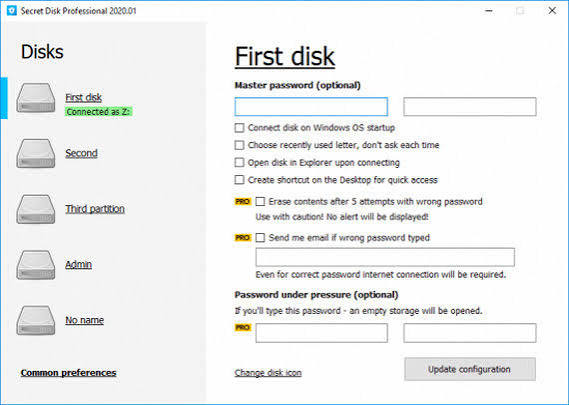
Creating a secret disk does not require you to repartition your hard drive, format any storage space, or make changes to your master boot record. The setup process is entirely automated. You launch the application, configure your new secret disk, assign it a drive letter, set a password, and the disk is ready to use within a minute. This zero friction setup is a significant advantage over alternatives that require technical knowledge to configure.
Multiple Secret Disks
Secret Disk Professional allows you to create more than one secret disk on the same machine. You can assign each disk a different drive letter and a different password. This is useful for separating different categories of sensitive files, for example keeping personal documents separate from work files, or allowing multiple users on the same machine to each have their own private storage space without sharing access.
Custom Drive Letter Assignment
You have full control over which drive letter is assigned to each secret disk. This lets you maintain a consistent file organization system and ensures that shortcuts or program paths pointing to your secret disk remain valid across sessions.
Automatic Lock on System Disruption
As mentioned earlier, any unexpected Windows crash, forced shutdown, or power loss will automatically lock all active secret disks. Since the drive visibility information lives in volatile memory, it vanishes the moment power is cut. This passive safety feature means your private files are protected even if you cannot manually lock the disk before an unexpected event.
Full Compatibility with Windows Applications
Because a secret disk presents itself to Windows as a standard drive, every application on your system can interact with it normally. You can install software to a secret disk, save documents from Microsoft Office directly to it, use it as a media library, and back it up using standard backup tools. There are no compatibility issues or special configurations required for any third party software.
Secret Disk Professional Portable Edition
The portable version of Secret Disk Professional is a self contained executable that does not require installation. You can carry it on a USB flash drive and run it on any compatible Windows PC without leaving any files in the Windows registry or in system directories. This makes it ideal for users who work on multiple machines and want to bring their private storage solution with them, or for users who prefer not to install software permanently on a shared or work computer.
The portable edition retains all the features of the installed version. The only limitation is that some advanced integrations, such as autostart at Windows boot, may require the installed version to function properly.
System Requirements and Technical Details
Secret Disk Professional 2026 v323 has the following technical specifications.
- The software runs on Windows 7, Windows 8, Windows 10, and Windows 11. Both 32 bit and 64 bit versions of Windows are supported. The installer requires .NET Framework 4.5 or a later version, which is included by default in Windows 8 and above. Users on Windows 7 may need to install .NET Framework separately if it is not already present.
- The installation file size is approximately 2 MB, making it one of the most compact security utilities available. The runtime memory footprint is minimal and the software has no noticeable impact on system performance during normal operation.
- The software is multilingual and supports a wide range of interface languages. The developer, PrivacyRoot, maintains an active release history with periodic updates that improve compatibility with new versions of Windows.
Who Should Use Secret Disk Professional
Secret Disk Professional is best suited for everyday users who want a simple, fast, and non technical way to keep personal files private on a Windows PC. It is particularly well suited for the following situations. Families who share a single computer and want to keep personal documents, financial records, or private photos away from other household members will find the one click lock and unlock workflow extremely convenient. There is no need to explain encryption concepts or manage complex software. You lock the disk before stepping away and unlock it when you return. Business professionals who work on laptops in public spaces, co working environments, or client offices can use Secret Disk Professional to quickly hide confidential project files, contracts, or client data before sharing their screen or handing the machine to someone else.
Students who use shared computers in dormitories or computer labs can store personal files on a portable secret disk on a USB drive and access them without leaving any trace on the host machine. Users who want a secondary layer of privacy alongside full disk encryption can use Secret Disk Professional to create a quickly accessible private space within an already encrypted drive, further separating sensitive files from routine data.
Secret Disk Professional vs Other File Privacy Tools
Comparing Secret Disk Professional to similar tools helps clarify where it fits in the broader landscape of Windows privacy software. VeraCrypt is a powerful open source encryption tool that creates encrypted containers and can encrypt entire partitions. It offers stronger cryptographic protection but has a significantly steeper learning curve and noticeable performance overhead for large file operations. Secret Disk Professional is faster to set up and simpler to use on a daily basis, though it provides weaker cryptographic guarantees. Folder Guard is another Windows privacy tool that hides and locks specific folders rather than creating an additional virtual disk. It offers fine grained control over individual folder visibility but operates on existing folder structures rather than creating a dedicated private storage space.
Secret Disk Professional is more suitable for users who want a clean separation between their public and private storage. BitLocker, which is built into Windows Pro and Enterprise editions, encrypts entire drives and is deeply integrated with the operating system. It is excellent for protecting data if a laptop is stolen because the entire drive is unreadable without the recovery key. However, it does not provide the quick lock and unlock workflow that Secret Disk Professional offers for daily in session privacy needs. The two tools complement each other well and can be used simultaneously.
Frequently Asked Questions About Secret Disk Professional
Does Secret Disk Professional encrypt files?
No. Secret Disk Professional does not use file encryption. It restricts operating system level access to a virtual disk using a password. Files stored on the secret disk are not cryptographically scrambled. The protection is designed to prevent casual and intermediate level access rather than forensic recovery attempts.
Will my files be visible if Windows crashes?
No. Because the virtual disk visibility information is stored in volatile memory, any unexpected shutdown, crash, or power loss automatically causes all active secret disks to lock and become invisible. Your files will not be visible after a restart without entering the correct password.
Can I use Secret Disk Professional on multiple computers?
You can run the portable edition on any compatible Windows PC without installing it. The standard licensed version is tied to the number of installations permitted by your license. Check the PrivacyRoot website for current licensing terms.
How many secret disks can I create?
Secret Disk Professional supports multiple secret disks on a single machine. You can assign each disk its own drive letter and its own unique password, which allows different users or different categories of content to be separated cleanly.
Is Secret Disk Professional compatible with Windows 11?
Yes. The latest version, Secret Disk Professional 2026 v323, is fully compatible with Windows 11 in both 32 bit and 64 bit configurations.
Does the software slow down my computer?
No. Because Secret Disk Professional does not encrypt or decrypt file data, there is no processing overhead during normal file operations. The application has a minimal memory footprint and does not run background processes that affect system performance.
Final Verdict
Secret Disk Professional is a well executed, practical privacy tool that delivers exactly what it promises. If you need a fast and simple way to create hidden, password protected storage on a Windows PC without dealing with complex encryption setups, this software is one of the best options available. The one second lock and unlock workflow, automatic protection on system disruption, support for multiple drives, and tiny file size make it an excellent choice for everyday personal and professional privacy needs. It is not a substitute for full disk encryption if your threat model includes physical theft or forensic analysis of your storage media.
For those scenarios, combining Secret Disk Professional with BitLocker or VeraCrypt is the most comprehensive approach. For the much more common scenario of protecting files from other users on a shared computer or quickly hiding sensitive data in a semi public environment, Secret Disk Professional is fast, reliable, and easy enough for any Windows user to operate confidently. Secret Disk Professional 2026 v323 is available as a 64 bit installer and as a portable edition, each approximately 2 MB in size. The developer PrivacyRoot provides regular updates and maintains compatibility with all current versions of Windows.
