
Pano2VR Pro is a professional software solution designed for photographers, designers, and virtual tour creators who need to transform panoramic images into interactive immersive experiences. This powerful tool enables users to create, edit, and publish stunning 360-degree panoramas and complex virtual tours compatible with both desktop and mobile platforms without requiring any coding knowledge.
What Is Pano2VR Pro and Who Should Use It?
Pano2VR Pro is industry-standard software developed by Garden Gnome Software that specializes in converting panoramic and spherical images into interactive web-based tours. The software serves professionals across multiple industries including real estate agents, architectural photographers, tourism companies, museum curators, hotel and resort marketers, and freelance photographers who want to monetize their panoramic photography work.
The current version Pano2VR Pro 8.0.2 represents a significant evolution in panoramic image handling and virtual tour creation technology. The software runs on Windows 7 and higher with 64-bit architecture, offering streamlined performance and compatibility with modern operating systems.
Core Features and Capabilities of Pano2VR Pro
Image Enhancement and Correction Tools
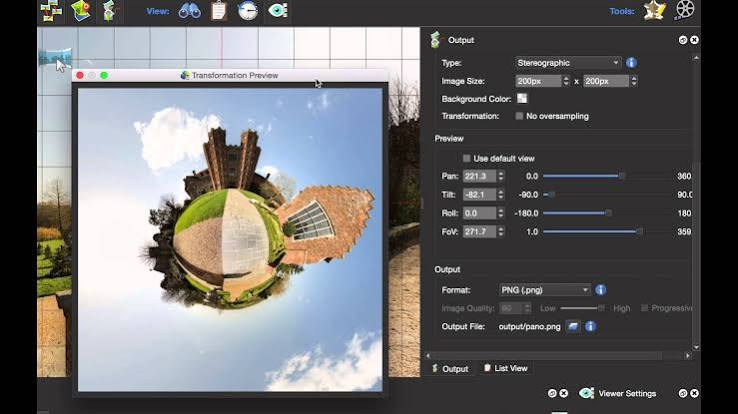
Pano2VR Pro includes sophisticated tools for improving the quality of your panoramic images. The software allows you to straighten horizons that are not level, a common issue when capturing panoramic images. Additionally, the tripod removal feature enables you to eliminate unwanted tripod shadows or stands that appear in your panoramic shots, resulting in cleaner, more professional-looking final products. These correction tools operate through an intuitive interface requiring just a few clicks to implement.
Professional Virtual Tour Creation
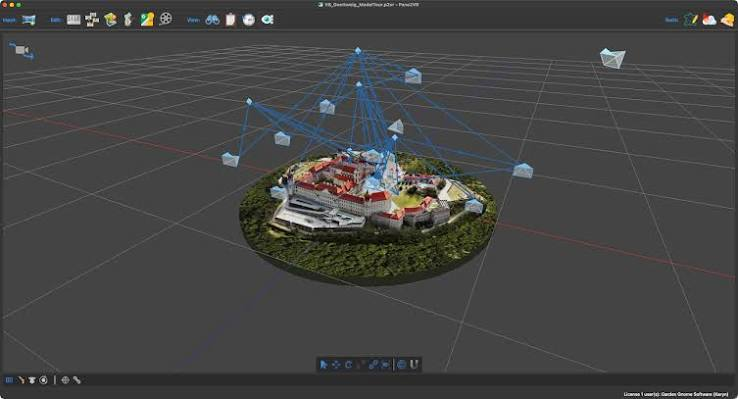
Building complex virtual tours with hundreds of nodes becomes straightforward with Pano2VR Pro. The software features automatic linking functionality that intelligently connects panoramas within your tour. The master node editing capability allows you to make global adjustments across multiple panoramas simultaneously, saving considerable time on large projects. The integrated tour map feature provides visitors with a navigation overview of your entire virtual tour, helping them understand the spatial relationships between different panoramic scenes.
Interactive Element Integration
You can enhance the immersive experience by adding hotspots that allow viewers to navigate between panoramas with intuitive clickable areas. The software supports directional audio integration, letting you add spatial sound effects that enhance the virtual environment. Video embedding capabilities enable you to incorporate video content directly within your panoramic scenes. These interactive elements transform passive viewing into engaging experiences that hold visitor attention.
Custom Skin Design and Interface Customization
The powerful skin editor included with Pano2VR Pro allows complete customization of viewer buttons and controllers without writing any code. You can design custom navigation buttons, control layouts, and user interface elements that match your brand identity. The responsive design system automatically adapts your custom interface to any screen size, ensuring your panoramic tours look professional whether viewed on desktop monitors, tablets, or smartphones.
Animation Path Creation and Video Export
Guide your viewers through the most compelling areas of your panoramic scenes by creating animated camera movement paths. These animation sequences can highlight architectural features, scenic viewpoints, or specific points of interest. Viewers maintain the ability to interact and explore beyond the predefined path. The software also enables you to export these animated paths as video files, creating promotional content or supplementary material for your projects.
Multi Format Export and Compatibility
Pano2VR Pro supports export to multiple formats including HTML5, Flash, and QuickTime VR formats. This flexibility ensures your panoramic tours work across different platforms and browsers. The software includes convenient plugins for popular content management systems including WordPress, Joomla, and Drupal, allowing seamless integration of your panoramic tours into existing websites. The projection transformation feature even enables you to convert your images into different projections suitable for specialized printing applications.
Technical Specifications and System Requirements
Pano2VR Pro 8.0.2 is optimized for Windows systems with the following specifications:
- Operating System requirements include Windows 7 and all subsequent versions including Windows 8, Windows 10, and Windows 11, with mandatory 64-bit architecture. The software delivers optimal performance on systems with modern multi-core processors and adequate RAM for handling large panoramic files.
- The installation includes comprehensive support for multilingual interfaces, making it accessible to users worldwide. The file size for the current version is approximately 260 megabytes for the full installation package.
Portable Version Advantages
The portable version of Pano2VR Pro eliminates the need for traditional installation, allowing you to run the software directly from a USB drive or external storage device. This portability makes the software ideal for photographers who work at multiple locations or travel frequently. You can take your complete panoramic tour creation toolkit wherever you go without requiring installation rights or IT department approval. The portable edition maintains full feature parity with the installed version while providing unmatched flexibility.
Use Cases and Professional Applications
Real estate professionals utilize Pano2VR Pro to create immersive property tours that increase buyer interest and reduce physical showings. The virtual tour capability allows prospective buyers to explore properties at their convenience from anywhere in the world. Tourism and hospitality businesses use Pano2VR Pro to showcase hotels, resorts, attractions, and destinations in immersive ways that inspire travel decisions. Museums and cultural institutions create interactive exhibits that enhance visitor engagement and provide alternative access to collections.
Architectural firms employ the software for project visualization and client presentations. The ability to showcase building interiors and exteriors in three dimensions communicates design intent more effectively than traditional photographs or renderings. Event photographers create memorable panoramic records of weddings, conferences, and celebrations that capture the complete atmosphere of occasions. Real estate photographers differentiate their services by offering advanced virtual tours that justify premium pricing.
Comparing Pano2VR Pro to Alternative Solutions
When evaluating panoramic tour software, Pano2VR Pro distinguishes itself through its combination of powerful professional features and accessible user interface. Unlike basic alternatives, Pano2VR Pro requires no programming knowledge while delivering enterprise-level results. The software balances comprehensive feature sets with workflow efficiency, allowing professionals to complete projects quickly without sacrificing quality or customization options.
The inclusion of the skin editor represents significant value as many competing solutions require coding expertise for interface customization. The multi-format export capabilities ensure broader compatibility than competitors offering limited export options.
Getting Started with Pano2VR Pro
Starting your panoramic tour creation journey with Pano2VR Pro involves obtaining the software through the provided download links. The current version Pano2VR Pro 8.0.2 in 64-bit format offers the most current features and optimizations. Previous versions including Pano2VR Pro 7.1.10 and earlier releases remain available for users with specific compatibility requirements.
The software interface presents a logical workflow that guides users through the tour creation process. Even users new to panoramic photography can produce professional results by following the intuitive step-by-step interface.
File Size and Download Specifications
Pano2VR Pro 8.0.2 requires approximately 260 megabytes of disk space for the 64-bit version. The portable version of earlier releases typically occupies around 106 to 127 megabytes depending on the specific version. These modest file sizes enable quick downloads even on moderate internet connections.
Advanced Panoramic Photography Techniques with Pano2VR Pro
Understanding fundamental panoramic photography principles helps maximize Pano2VR Pro capabilities. Capturing panoramic images requires specific camera techniques including maintaining consistent exposure, using manual focus, and overlapping image segments properly for stitching software. Once properly captured, Pano2VR Pro refines and transforms these panoramic images into interactive experiences.
Gigapixel panoramas represent the most advanced application of Pano2VR Pro. These ultra-high-resolution panoramic images captured from multiple camera positions contain enormous detail and allow viewers to zoom into specific areas while maintaining context. Pano2VR Pro efficiently handles these computationally demanding files, making gigapixel panoramas accessible to professional photographers.
Customization Options and Branding Capabilities
The skin editor functionality allows you to embed your brand identity throughout the viewer interface. Color schemes can match your website or brand standards. Logo placement becomes customizable, ensuring your brand remains visible throughout the viewer experience. Button styling and layout modifications enable interface designs that feel native to your brand rather than appearing as generic software output.
These customization capabilities prove valuable for agencies and freelancers who deliver white label solutions to clients. The ability to completely customize the viewer interface ensures your work appears as custom development rather than template-based software output.
Multi Node Tour Complexity Management
As virtual tours grow in complexity, effective navigation becomes critical. Pano2VR Pro manages this complexity through the master node editing feature, which applies modifications across multiple panoramas simultaneously. Changes to transition effects, tour branding, or interactive elements propagate throughout the entire tour automatically, preventing inconsistencies across panoramic scenes.
The integrated tour map provides visitors with spatial orientation, helping them understand tour structure and navigate efficiently. For large-scale tours spanning hundreds or thousands of panoramic nodes, these organizational tools become indispensable for both creation and visitor experience.
Audio and Spatial Sound Integration
Adding audio dimensions to virtual tours dramatically enhances immersion. Pano2VR Pro supports directional audio integration, enabling sound effects that appear to emanate from specific locations within the panoramic scene. This spatial audio capability creates more convincing immersive environments than simple background audio tracks.
Audio applications range from ambient music that enhances atmosphere to location-specific sound effects that guide visitor attention. Museums might use audio to provide guided narration while real estate agents employ audio to highlight key features.
Video Integration Within Panoramic Scenes
Video embedding capabilities allow you to place video windows within your panoramic environments. This hybrid approach combines static panoramic scenes with dynamic video content, creating more engaging experiences. Use cases include real estate videos showing property details, demonstration videos in museum exhibits, or promotional content for tourism destinations.
Export and Publishing Workflow
The complete export pipeline in Pano2VR Pro streamlines publishing to various platforms. HTML5 export creates web-compatible tours that work in modern browsers without plugin requirements. Flash export serves legacy browser support needs. QuickTime VR export preserves compatibility with specialized applications requiring this format.
For WordPress users, the included WordPress plugin enables embedding panoramic tours directly within blog posts and pages through simple shortcodes. Similar plugins for Joomla and Drupal provide equivalent convenience for those platforms.
Frequently Asked Questions About Pano2VR Pro
What experience level does Pano2VR Pro require?
The software is specifically designed for users without programming knowledge. The intuitive interface guides users through the tour creation process with clear menus and logical workflows. Beginners can produce professional results within hours of starting.
Can Pano2VR Pro handle very large panoramic images?
Yes, Pano2VR Pro efficiently processes gigapixel panoramas without performance degradation. The software optimizes display performance automatically based on viewer capabilities and device specifications.
Does Pano2VR Pro require an internet connection for operation?
No, the software operates entirely offline. Internet connection is only necessary for uploading completed tours to web servers or accessing online resources.
Can I embed Pano2VR tours on my existing website?
Yes, the HTML5 export and CMS plugins enable seamless integration into existing websites. Tours can be embedded using simple code snippets or plugin functionality depending on your platform.
What file formats does Pano2VR Pro accept as input?
The software accepts standard image formats including JPEG, TIFF, and PNG for individual panoramic images or spherical images from panoramic photography or stitching software.
Can viewers navigate tours on mobile devices?
Yes, responsive design adaptation ensures panoramic tours display and function properly on smartphones, tablets, and desktop browsers. Touch-based navigation on mobile devices enables intuitive interaction.
Conclusion
Pano2VR Pro 8.0.2 stands as a comprehensive solution for anyone seeking to create professional panoramic tours and immersive virtual experiences. The combination of powerful image correction tools, complex tour management capabilities, interactive element support, and flexible export options positions Pano2VR Pro as an essential tool for photographers, real estate professionals, tourism marketers, and creative agencies. Whether you are creating simple single panoramic scenes or elaborate multi-node virtual tours spanning entire buildings or regions, Pano2VR Pro provides the professional tools required to deliver compelling results. The software eliminates technical barriers through its no-code interface while offering advanced customization for professionals demanding complete creative control.
The portable version adds flexibility for professionals working at multiple locations, while the modular feature set ensures you only learn the capabilities necessary for your specific projects. Updated regularly with new features and performance optimizations, Pano2VR Pro continues to evolve alongside changing web standards and user expectations for immersive content. For professionals serious about panoramic photography and virtual tour creation, Pano2VR Pro deserves consideration as the centerpiece of your creative toolkit.
