
![VovSoft Audio to Lyrics Converter 1.0 [Latest]](https://pcfile.site/wp-content/uploads/2026/06/new.webp)
VovSoft Audio to Lyrics Converter is a lightweight Windows desktop application that uses offline AI technology to automatically transcribe audio files into synchronized lyrics, subtitles, and plain text. Powered by OpenAI Whisper models running entirely on your local machine, it converts MP3, WAV, OGG, and FLAC audio into LRC, SRT, VTT, or TXT output formats without requiring any internet connection, cloud subscription, or recurring fee. Whether you are a musician building a karaoke library, a content creator adding subtitles to videos, or a researcher transcribing podcasts and lectures, this tool handles the entire process automatically and keeps your audio files completely private.
What Is VovSoft Audio to Lyrics Converter?
VovSoft Audio to Lyrics Converter is a dedicated audio transcription utility developed by Vovsoft, a software company known for producing practical and lightweight Windows tools. Version 1.0 of this application introduces a fully offline AI transcription pipeline based on the OpenAI Whisper speech recognition model. Instead of sending your audio to a remote server, the software downloads and runs the Whisper model locally on your PC, meaning your recordings never leave your computer and you pay nothing beyond the one-time software cost.
The core job of the program is to listen to any audio file you provide and generate a text file where every line of speech or lyrics is paired with a precise timestamp. This makes the output immediately usable in music players that support LRC lyric display, in video editing software that accepts SRT or VTT subtitle tracks, or in any word processor that reads plain TXT files.
Key Features of VovSoft Audio to Lyrics Converter
Offline AI Transcription Using OpenAI Whisper
The most important feature of this software is its use of OpenAI Whisper, one of the most accurate open-source speech recognition models available today. The software downloads and stores the Whisper model locally, so all audio processing happens on your own hardware. There is no data sent to any external server, no API key required, and no risk of your recordings being stored in a third-party cloud. Users can choose from different model sizes to balance transcription speed against accuracy, with the standard model weighing approximately 465 MB.
Wide Audio Format Support
VovSoft Audio to Lyrics Converter accepts all major audio formats used in music and media production. Supported input formats include MP3, WAV, OGG, and FLAC. This means you can work directly with files downloaded from streaming platforms, recorded on your own microphone, ripped from CDs, or exported from your digital audio workstation without needing to convert them first.
Multiple Output Formats for Every Use Case
- The software exports transcriptions in four distinct formats, each suited to a different workflow.
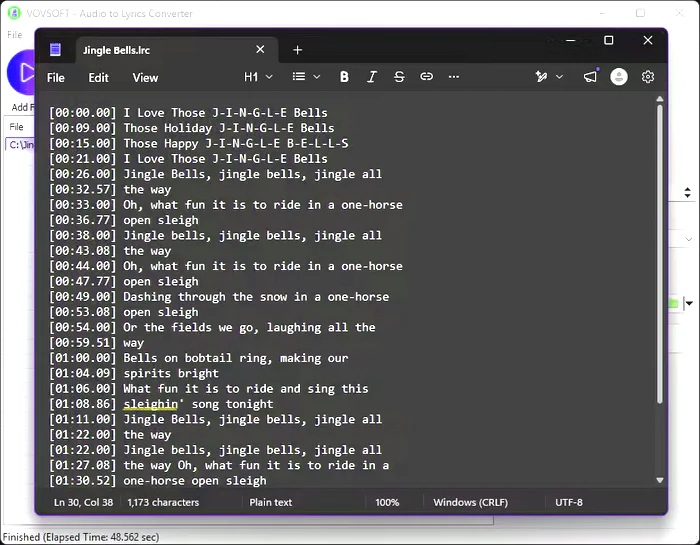
- LRC files are the standard format for synchronized lyrics in music players and karaoke systems. Each line in the file is tagged with a timestamp so the lyrics scroll in time with the song.
- SRT and VTT files are the standard subtitle formats used by video players, streaming platforms, and video editing applications. If you are adding captions to a YouTube video, a podcast clip, or a film project, these are the formats you need.
- TXT files strip all timestamps and produce a clean plain text transcription ideal for reading, editing, archiving, or feeding into a word processor or translation tool.
Batch Processing for Multiple Files
Rather than processing one file at a time, VovSoft Audio to Lyrics Converter lets you queue individual audio tracks or point it at an entire folder. The software works through each file in sequence, producing a separate output for each one. This is especially useful for content creators who regularly need to caption large batches of recordings, or for archivists converting an entire music or podcast library in a single session.
Precise Synchronized Timestamps
The software automatically inserts timestamp tags at the correct positions in the generated lyrics. Timestamps are formatted in the standard minute and second notation used by LRC and subtitle files, for example 00:26.00, ensuring that lyrics and captions are perfectly aligned with the audio track when played back in any compatible application.
Customizable Line Length
The maximum length of each transcribed line can be adjusted before conversion. This matters because short lines read better in a music player while longer lines may be preferred in a plain text document. Adjusting this setting before batch conversion ensures the output is formatted correctly for your target application without requiring manual editing afterward.
Drag and Drop Interface
Loading files into the software is as simple as dragging one or more audio files or a folder directly into the application window. There is no need to navigate through dialog boxes or configure import settings for standard use cases. This makes the workflow fast and accessible even for users who are not technically experienced.
Supported Output Formats at a Glance
- LRC synchronized lyrics are compatible with foobar2000, Winamp, Poweramp, and most karaoke software. SRT subtitles work in VLC, Premiere Pro, DaVinci Resolve, YouTube, and virtually every video platform. VTT subtitles are the web standard used in HTML5 video players and platforms like Vimeo. TXT transcriptions are universally readable and ideal for editing, translation, or archiving.
Who Should Use VovSoft Audio to Lyrics Converter?
Musicians and music producers who distribute tracks online can use this tool to generate LRC files for platforms that support lyric display, or to produce accessible versions of their content. Video creators and podcasters who need accurate captions for accessibility compliance, SEO improvement, or audience engagement can convert their recordings to SRT or VTT files automatically without paying for a transcription service. Researchers, journalists, and students who record interviews, lectures, or meetings can convert hours of audio into searchable, editable text documents in minutes rather than spending hours typing manually.
Language learners who want to read along with audio content in their target language can use the LRC output to follow lyrics or speech word by word. Archivists and librarians building searchable digital collections can process entire folder libraries of audio recordings into indexed text files overnight using batch mode.
Why Offline AI Transcription Matters?
Most competing transcription tools either require an active internet connection to send audio to a cloud API, charge per minute of audio processed, or store your recordings on remote servers to improve their models. VovSoft Audio to Lyrics Converter eliminates all three of these concerns. The OpenAI Whisper model used internally is the same technology that powers many of the leading commercial transcription services, but in this case it runs entirely within your own operating system environment.
This means there are no subscription fees, no per-minute charges, no privacy exposure, and no risk of service disruption due to network outages.
How VovSoft Audio to Lyrics Converter Compares to Online Tools?
Online transcription services such as Otter.ai, Descript, and similar platforms offer cloud-based audio to text conversion with varying accuracy levels. These platforms typically require account registration, impose usage limits on free tiers, and charge monthly or per-minute fees for extended use. Your uploaded audio files pass through their servers, which creates privacy and data security considerations for sensitive recordings.
VovSoft Audio to Lyrics Converter uses the same Whisper AI model locally, charges a one-time license fee, and never touches your audio data after it leaves your hard drive. For users who regularly work with large volumes of audio or who handle confidential recordings, the offline approach is both more economical and more secure over time.
System Requirements
- VovSoft Audio to Lyrics Converter 1.0 runs on Windows 10 and Windows 11, 64-bit editions only. The software requires sufficient disk space to store the Whisper AI model, with the standard model requiring approximately 465 MB. A modern multi-core processor will produce faster transcription results, and systems with a supported GPU may benefit from accelerated processing depending on the model configuration used.
Technical Details
- Software Name: VovSoft Audio to Lyrics Converter 1.0 Developer: Vovsoft Platform: Windows 10 and Windows 11 (64-bit) License: Full Version Language: English File Size: 133 MB
Frequently Asked Questions
Does VovSoft Audio to Lyrics Converter need an internet connection to work?
No. All transcription is performed by the OpenAI Whisper model running locally on your PC. Once the model is downloaded, the software operates entirely offline.
What audio formats does the software support?
The software accepts MP3, WAV, OGG, and FLAC audio files as input.
What output formats can it produce?
It can export to LRC for synchronized lyrics, SRT for video subtitles, VTT for web subtitles, and TXT for plain text transcription.
Can I convert multiple audio files at once?
Yes. The batch processing feature lets you add individual files or entire folders and convert them all in a single automated session.
Is my audio data kept private?
Yes. Because all processing is done locally, your audio files are never uploaded to any server or shared with any third party.
What AI model does it use?
VovSoft Audio to Lyrics Converter uses the OpenAI Whisper speech recognition model, running locally on your device.
Does it work on 32-bit Windows?
No. The software requires a 64-bit version of Windows 10 or Windows 11.
Final Thoughts
VovSoft Audio to Lyrics Converter 1.0 is a practical, privacy-focused solution for anyone who needs to convert audio into synchronized lyrics or subtitles without paying ongoing subscription fees or sending recordings to the cloud. Its use of the OpenAI Whisper model ensures high transcription accuracy across music, speech, and mixed audio content. The combination of batch processing, multiple output formats, drag-and-drop usability, and complete offline operation makes it one of the most capable and cost-effective audio transcription tools available for Windows users in 2026.
