
IMobie DroidKit is a powerful all-in-one Android toolkit for Windows that lets you unlock screens, bypass FRP locks, recover lost data, repair system errors, and manage your Android device without any technical knowledge or rooting your phone. Whether your Android device is frozen, crashed, locked, or simply running slow, DroidKit provides a one-stop solution to fix the problem in minutes from your PC.
What Is IMobie DroidKit and Who Is It For?
IMobie DroidKit is a professional Android management and repair software developed by iMobie Inc., a trusted name in mobile utility tools. The software is designed for Windows users who need a reliable way to troubleshoot, recover, and maintain Android smartphones and tablets without visiting a repair shop or hiring a technician.DroidKit is ideal for everyday users who have forgotten their screen lock PIN or password, people who bought a second-hand phone stuck on a Google FRP lock screen, users who have accidentally deleted important photos, messages, or contacts, anyone whose Android device is stuck on the boot screen or showing a black screen, and tech enthusiasts who want full control over Android data and system files.
The latest version is IMobie DroidKit 2.3.8.20260611, which runs on 64-bit Windows and requires approximately 299 MB of storage space.
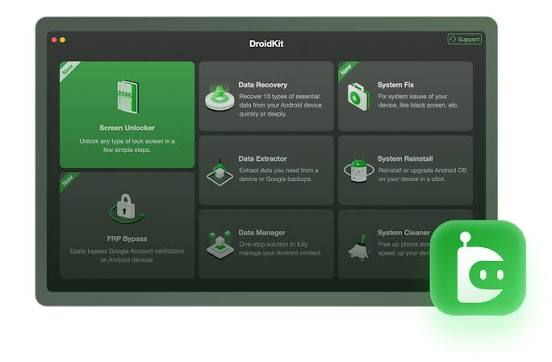
Key Features of IMobie DroidKit Explained in Detail
Screen Unlock: Remove Any Type of Android Lock Without Data Loss
One of the most used features in DroidKit is the Screen Unlocker. It removes all types of screen locks from Android devices including PIN, password, pattern lock, fingerprint recognition, and face unlock. This is especially helpful when you have forgotten your lock screen credentials, your fingerprint sensor is not responding, or your phone screen is cracked and touch input is unreliable.
DroidKit supports screen unlocking for Samsung, LG, Motorola, Huawei, Xiaomi, OnePlus, and virtually all other major Android brands. The process requires no root access and is completed in just a few steps from your Windows computer. You do not need any coding knowledge or technical background to use this feature successfully.
FRP Lock Bypass: Remove Google Account Verification Instantly
FRP, or Factory Reset Protection, is a security feature built into Android that requires you to verify your Google account after a factory reset. While this protects against theft, it becomes a problem when you forget your account credentials or purchase a second-hand device still linked to a previous owner’s Google account.
IMobie DroidKit includes a dedicated FRP bypass module that provides customized solutions based on the specific Android version and device model. This tailored approach gives DroidKit one of the highest FRP bypass success rates among Android repair tools available in 2026. The process is fully guided, non-technical, and takes only minutes to complete.
Android System Repair: Fix OS Errors Without Rooting Your Device
DroidKit can diagnose and repair a wide range of Android system issues without requiring you to root your device. Common problems it resolves include black screen of death, phone stuck on boot screen or logo, frozen or unresponsive touch screen, apps crashing repeatedly, camera not working or showing a failed error, Wi-Fi or Bluetooth connectivity issues, and Android stuck in recovery mode.
The repair engine inside DroidKit uses an intelligent diagnostic algorithm that identifies the exact issue and applies a fix customized for your specific Android OS version and hardware model. This targeted repair method significantly increases the chances of a successful fix without corrupting other system data.
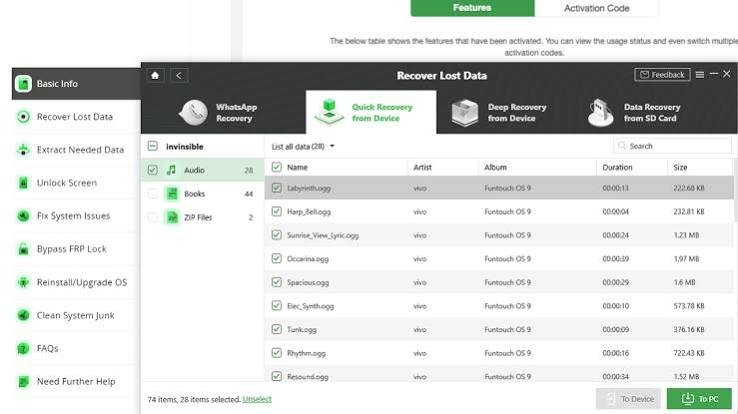
Android Data Recovery: Recover 13 Types of Lost Files in Minutes
Accidentally deleted a photo or lost your entire WhatsApp conversation history? DroidKit includes a dedicated data recovery module that can scan your Android phone storage and recover up to 13 types of data with no root required.
The types of data recoverable with DroidKit include photos and images, videos, audio files and music, SMS text messages, call logs, contacts, WhatsApp messages and media, Viber chat history, documents and PDFs, notes, calendar events, app data, and more. The Quick Recovery mode performs a fast surface scan ideal for recently deleted files, while Deep Recovery mode performs an exhaustive scan of every storage sector to find files that have been deleted for longer periods and not yet overwritten.
DroidKit also supports data recovery from sources beyond the internal phone storage.
Recovery From Additional Sources
DroidKit extends its recovery capabilities to Google Account data including Google Photos, Google Contacts, and Google Calendar backups, as well as WhatsApp cloud backups linked to your account. You can scan, preview, and selectively restore only the specific files you need without performing a full account restore.For Samsung users with a physically damaged or system-crashed device, DroidKit can extract data directly from the broken phone and transfer it to a new Android device or save it to your Windows computer. This feature is a lifesaver when your screen is shattered or the phone will not turn on at all.
DroidKit also supports recovery from formatted or accidentally erased SD cards, restoring deleted photos, videos, and documents without needing specialized hardware tools.
Android Data Manager: Transfer and Manage All Phone Data From Your PC
DroidKit acts as a full-featured Android file manager that integrates all your device data into a single organized interface on your Windows computer. You can browse, preview, and manage personal data, photos, videos, music, documents, contacts, apps, and miscellaneous files from one central dashboard.
With the data manager, you can transfer photos and videos from your Android phone to your PC for safekeeping or editing, copy music and movies from your computer to your phone for offline playback, export contacts and messages for backup, and install or remove APK files with ease. All transfers are encrypted and secure, ensuring your data is never at risk during the process.
Android ROM Installer: Reinstall or Upgrade Android OS Safely
Reinstalling or upgrading an Android operating system traditionally requires downloading a compatible ROM file, using a third-party flash tool, and going through complex command-line steps that can brick your device if done incorrectly. DroidKit simplifies this entire process into a few guided clicks.
DroidKit automatically identifies your device model and Android version, then matches and downloads the correct official ROM from verified sources. It then installs the ROM without requiring root access and without exposing your device to unofficial or malware-infected firmware files. This feature is ideal for restoring a phone to factory condition with a clean OS, removing stubborn malware baked into the system, and upgrading to a newer Android version your carrier has not pushed yet.
Phone Cleaner: Free Up Storage and Speed Up Your Android in One Click
DroidKit includes a smart phone cleaner that scans your Android device for unnecessary files that are slowing it down or consuming valuable storage space. It identifies and categorizes junk cache files, residual background app data, redundant APK installer files, and oversized files you may have forgotten about.
Unlike manual cleaning which risks deleting important system files, DroidKit safely separates junk from essential data and lets you review everything before deletion. You can wipe all junk at once or selectively remove only specific categories. After cleaning, most users notice a significant improvement in device speed and available storage capacity.
IMobie DroidKit Technical Specifications
Software Name: IMobie DroidKit 2.3.8.20260611 Developer: iMobie Inc. Supported Operating System: Windows 10 and Windows 11 (64-bit) License Type: Full Version Language Support: Multilingual File Size: 299 MB Android Support: Android 4.0 and above Device Compatibility: Samsung, LG, Motorola, Huawei, Xiaomi, OnePlus, Sony, Google Pixel, and most other Android brands
How to Use IMobie DroidKit: Step by Step Guide?
Using DroidKit is straightforward regardless of which feature you need. The general process follows these steps.
First, download and install IMobie DroidKit on your Windows PC. Launch the application and connect your Android device via a USB cable. Enable USB Debugging on your Android phone by going to Settings, then About Phone, tapping the Build Number seven times to unlock Developer Options, and then enabling USB Debugging from the Developer Options menu. Select the feature you need from the DroidKit home screen such as Screen Unlock, System Repair, or Data Recovery. Follow the on-screen instructions specific to the chosen module. DroidKit will guide you through each step with clear prompts and progress indicators.
Most operations are completed within a few minutes and do not require any technical knowledge beyond following the step-by-step interface.
IMobie DroidKit vs Alternative Android Repair Tools
When compared to other Android repair and management tools available in 2026, DroidKit stands out for several reasons. Unlike basic ADB tools that require command-line knowledge, DroidKit provides a fully graphical interface accessible to non-technical users. Compared to competitors like Tenorshare ReiBoot for Android or Dr.Fone, DroidKit offers a broader combination of system repair, data recovery, FRP bypass, and ROM installation in a single package. Its customized per-device repair algorithm gives it a higher success rate on specific models rather than applying a one-size-fits-all approach.
Frequently Asked Questions About IMobie DroidKit
Does IMobie DroidKit require rooting my Android phone?
No. DroidKit is specifically designed to work without rooting your device. All features including screen unlock, system repair, and data recovery function on unrooted Android phones.
Will using DroidKit erase my data?
Some features such as screen unlocking may erase device data as part of the unlock process. However, features like Quick Data Recovery and Deep Recovery are designed to retrieve data without causing further loss. Always back up your data before performing system-level operations.
Which Android versions does DroidKit support?
DroidKit supports Android 4.0 through the latest Android 15 releases, covering the vast majority of Android devices currently in use.
Is DroidKit safe to use?
Yes. DroidKit uses official ROMs from verified sources for its ROM installer feature and does not expose your device to malicious firmware. It is a legitimate software tool developed by iMobie Inc., a reputable company with years of experience in mobile utility software.
Can DroidKit recover data from a water-damaged phone?
If the phone’s internal storage is still intact and the device can be recognized by a computer via USB, DroidKit may be able to extract and recover data from a water-damaged Android device.
Why IMobie DroidKit Is Worth Using in 2026?
Android devices handle more of our personal and professional lives than ever before, making data loss and device malfunction increasingly costly problems. IMobie DroidKit addresses this by providing a comprehensive toolkit that replaces what would otherwise require multiple separate applications or expensive repair visits.The software is regularly updated to support new Android versions and device models, ensuring compatibility with modern hardware. Its no-root approach respects device security while still providing deep access to system repair and data recovery functions.
For anyone who owns an Android device and wants a dependable safety net for when things go wrong, DroidKit is among the most complete solutions available on Windows today.Whether you are locked out of your phone, dealing with a system crash, trying to recover deleted memories, or simply wanting to keep your device running at peak performance, IMobie DroidKit delivers the tools to handle it all from a single, user-friendly interface.
