
![ByClick Downloader 2.4.32 Free Download [Latest]](https://pcfile.site/wp-content/uploads/2026/06/click.webp)
ByClick Downloader is a Windows video downloading program that saves videos and audio from YouTube, Facebook, Instagram, Vimeo, and dozens of other streaming sites with a single click. It detects playable video on a page automatically, shows a small popup with download options, and saves the file in your chosen format and quality. This guide explains what the software does, how its features actually work, what the portable edition offers, how much it costs, how to install it safely, and which alternatives are worth comparing before you buy.
What Is ByClick Downloader?
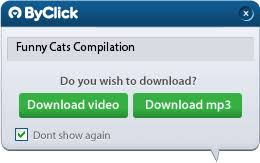
ByClick Downloader, originally released as YouTube By Click, is a desktop application built for people who want an easy way to save online videos for offline viewing. Instead of pasting a link into a website or browser extension, the program runs in the background and watches your browser tabs. When it recognizes a downloadable video, a notification appears in the corner of your screen letting you pick video or audio and start the save instantly.
The tool is aimed at casual users such as students saving lecture videos, content creators archiving their own uploads, and music fans converting videos to MP3. It works with Chrome, Firefox, Edge, and Internet Explorer.
Key Features of ByClick Downloader
Automatic One Click Detection
The core feature is the popup detector. Open any supported video page and a small prompt appears at the bottom right of the screen offering an instant download as video or audio, with no copying or pasting of URLs required.
Bulk Downloads for Playlists and Channels
Rather than saving videos one at a time, you can queue an entire YouTube playlist or download every video published on a channel in one batch. This is useful for archiving a course, a podcast feed, or a music collection without manually clicking through each video.
Multiple Simultaneous Downloads
The software supports downloading several videos at the same time and tracks the progress of each one in a dashboard, so a large batch finishes faster than downloading files sequentially.
Private Video Support
ByClick Downloader can save private YouTube and Facebook videos that you have permission to view, which many competing tools cannot handle because they rely only on public page scraping.
HD and Higher Resolution Output
The program supports high definition output and advertises support for very high resolutions on newer versions, so footage keeps its original sharpness after saving.
Built In Audio and Format Conversion
Downloaded clips can be converted directly to MP3, MP4, AVI, and other common formats. For music downloads, the software automatically fills in artist and track name metadata so files are organized in a media library without manual editing.
Subtitle and Long Video Support
The tool can grab available subtitle tracks alongside the video file and has no problem handling videos longer than an hour, which trips up some lightweight downloader extensions.
Supported Platforms and Websites
ByClick Downloader works across more than 40 sites, with the most commonly used being YouTube, Facebook, Instagram, Twitter or X, Vimeo, and Dailymotion. Instagram support also extends to saving photos from user profiles, not just video content.
ByClick Downloader Portable Edition Explained
The portable build is a single executable that runs without a traditional installation process. You can keep it on a USB drive or cloud folder and launch it on any Windows computer without writing entries to the registry or leaving configuration files behind. This makes it a practical option for shared computers, locked down work laptops where installing software is restricted, or anyone who simply prefers a clean, install free workflow. The tradeoff is that automatic browser integration can be less reliable than the fully installed version, since some features rely on registry hooks that the portable build intentionally skips.
System Requirements
- ByClick Downloader runs on Windows only. There is no native Mac or Linux build, so users on those platforms need a virtual machine or a different tool entirely. A standard modern Windows PC with a stable internet connection is enough to run it comfortably, since the application itself is lightweight at under 50 megabytes.
ByClick Downloader Pricing: Free Trial vs Premium
- The base version of ByClick Downloader is free to install and covers standard single video downloads. The premium tier unlocks playlist and channel batch downloads, private video access, faster simultaneous downloading, and priority support. Pricing is typically sold as a one time license or a subscription depending on current promotions on the official site, so check the current offer before purchasing rather than relying on older published prices.
How to Download and Install ByClick Downloader Safely?
- Go to the official website at byclickdownloader.com rather than a third party mirror or file sharing site.
- Choose the installer or the portable build depending on whether you want a permanent setup or a no install option.
- Run the downloaded file and follow the setup wizard, selecting your preferred language and install folder.
- Allow the browser extension prompt if you want the automatic popup detector to work in Chrome, Firefox, or Edge.
- Launch the application once installation finishes and confirm it opens without errors before granting it any further permissions.
Downloading installers only from the developer’s own site significantly reduces the risk of bundled adware or tampered files that are common on unofficial download portals.
How to Use ByClick Downloader Step by Step?
- Open the application and make sure the auto detect feature is enabled in settings.
- Browse to a video on a supported site such as YouTube or Facebook.
- Wait for the popup notification to appear in the corner of the screen.
- Choose whether you want the video file or just the audio track. Select your preferred quality and output format if prompted.
- Click download and monitor progress from the main dashboard.
- For playlists or channels, paste the playlist or channel link directly into the app instead of opening each video individually.
Is ByClick Downloader Safe to Use?
ByClick Downloader is a legitimate, long standing commercial product rather than malware, but user reviews are mixed on reliability and customer support responsiveness. Some users report occasional false flags from antivirus tools and slow replies from support on refund or bug requests. As with any downloader, install only from the official site, keep your antivirus active during installation, and avoid third party crack or keygen files, which are a common source of actual malware regardless of which legitimate program they claim to unlock.
It is also worth remembering that downloading videos from platforms like YouTube or Instagram may conflict with those platforms’ terms of service unless the content is your own, licensed for offline use, or covered by fair use in your jurisdiction. Respecting copyright is the user’s responsibility, not the software’s.
Pros and Cons of ByClick Downloader
Pros:
- Genuinely one click workflow with no manual link copying.
- Strong batch support for playlists and full channels.
- Handles private videos that many competitors cannot.
- Built in MP3 conversion with automatic metadata tagging.
- Portable edition available for install free use.
Cons:
- Windows only, with no native Mac or Linux version.
- Some users report inconsistent customer support response times.
- Full feature set requires the paid premium upgrade.
- Occasional antivirus false positives reported by users.
Best Alternatives to ByClick Downloader
If ByClick Downloader does not fit your needs, consider comparing it against 4K Video Downloader Plus, SnapDownloader, ClipGrab, and VidJuice UniTube. Each offers a similar one click or paste link workflow, and some include native Mac support, which is the biggest gap in ByClick Downloader’s current lineup.
Frequently Asked Questions
Is ByClick Downloader free?
A free version exists for basic single video downloads. Batch playlist downloads, channel downloads, and private video support are part of the paid premium tier.
Does ByClick Downloader work on Mac or Linux?
No. The application is built exclusively for Windows. Mac and Linux users need a different downloader or a Windows virtual machine.
Can ByClick Downloader download private videos?
Yes, it can save private YouTube and Facebook videos as long as you already have permission to view them through your own account.
What is the difference between the installer and the portable version?
The installer integrates more deeply with your browser and Windows registry for smoother automatic detection. The portable version runs from a single file with no installation, which is convenient for USB drives or restricted computers but can have slightly less reliable browser popup detection.
Is it legal to use ByClick Downloader?
Using the software itself is legal. Whether downloading a specific video is allowed depends on that platform’s terms of service and copyright law in your country. Downloading content you do not own or have rights to may violate those terms.
Which sites does ByClick Downloader support?
It supports more than 40 sites, with YouTube, Facebook, Instagram, Vimeo, Twitter or X, and Dailymotion among the most popular.
Final Verdict
ByClick Downloader remains one of the more capable one click video downloaders for Windows users who regularly save YouTube playlists, private clips, or convert videos to MP3 in bulk. The portable edition adds flexibility for users who cannot or do not want to install software permanently. The main limitations are the Windows only restriction and mixed reports on customer support, so users who need Mac compatibility or guaranteed responsive support may want to weigh the alternatives listed above before buying the premium tier.
