
ViewCompanion Premium is a professional CAD file viewer, converter, and printer developed by Software Companions. It supports an exceptionally wide range of technical drawing formats including PLT, PDF, DWF, DXF, SVG, CGM, TIFF, CALS, Postscript, and more. Engineers, architects, and CAD professionals use it to view, annotate, print, and batch convert technical files without needing expensive CAD software like AutoCAD or MicroStation installed on every workstation.
What Is ViewCompanion Premium?
ViewCompanion Premium is a Windows application designed specifically for viewing and managing CAD and plot files. Unlike basic PDF viewers or generic image editors, it understands the technical structure of plotter file formats such as HPGL, HPGL/2, HP-RTL, and Calcomp, which are commonly produced by CAD systems for large-format printing. The software sits between a full CAD application and a simple viewer, giving users the power to work with complex technical drawings without requiring a CAD license.
The Premium edition is the top tier in the ViewCompanion lineup, offering every feature available in the Standard and Pro editions plus advanced tools for PDF optimization, PDF/A archiving, digital signatures, raster processing, and PDF to CAD conversion.
Supported File Formats in ViewCompanion Premium
One of the strongest aspects of ViewCompanion Premium is its broad format compatibility. Users can open and work with files across two categories: input formats and output formats.
Input Formats Supported
ViewCompanion Premium can open files in the following formats: PLT plotter files using HPGL, HPGL/2, HP-RTL, and Calcomp standards; Adobe PDF including multi-page documents; Autodesk DWF and DWFx; Postscript and Encapsulated Postscript (EPS); CGM (Computer Graphics Metafile); TIFF and multi-page TIFF; CALS raster format; JPEG, PNG, BMP, and other common image formats; and SVG (Scalable Vector Graphics).
Output Formats for Conversion
The software can convert any supported input file into the following output formats: Adobe PDF and PDF/A for archiving; Autodesk DWF for web distribution; DXF for compatibility with AutoCAD and other CAD applications; SVG for scalable web graphics; TIFF including multi-page TIFF; JPEG, PNG, BMP, and other raster formats; PLT plotter files; and CGM.
Key Features of ViewCompanion Premium
Viewing and Navigation
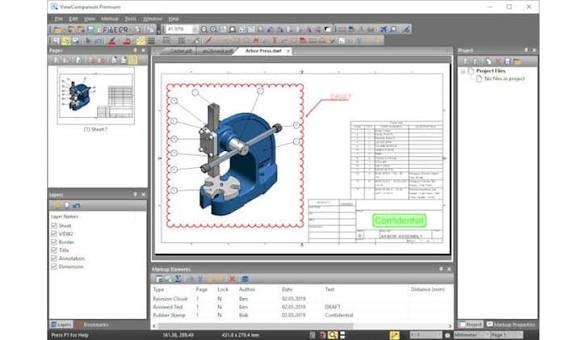
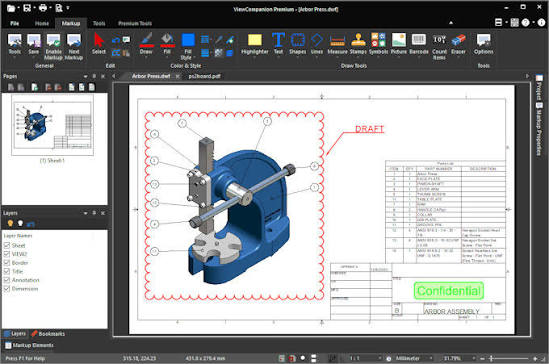
ViewCompanion Premium renders even complex technical drawings with precision. Users can zoom, pan, and rotate drawings, measure distances and areas with snap-to-geometry accuracy, and switch between color, grayscale, and black and white display modes. The interface supports multiple file tabs so users can work with several documents simultaneously.
Annotation and Markup Tools
The software includes a comprehensive set of markup tools. Users can add text notes, symbols, stamps, barcodes, images, and measurement annotations directly on top of any drawing. These annotations can be included or excluded when printing or converting, giving teams the flexibility to share both clean drawings and reviewed copies with comments.
Batch Conversion and Printing
Batch processing is one of the most productivity-enhancing features in ViewCompanion Premium. Users can select entire folders of files and convert or print them all in one operation. The software supports converting batches to PDF, DWF, DXF, TIFF, and other formats simultaneously. This eliminates repetitive manual work when processing large sets of CAD drawings.
Hot Folder Printing
The hot folder feature allows ViewCompanion Premium to monitor a designated folder on the system. Whenever a new file is copied or saved into that folder, the software automatically detects and prints it without any user interaction. This is particularly useful in production environments where drawings are regularly generated and need immediate printing.
PDF Tools and Management
ViewCompanion Premium includes a complete suite of PDF tools beyond simple viewing. Users can merge multiple PDF files of different formats into a single multi-page PDF, split a multi-page PDF into individual single-page files, optimize PDF file sizes, convert any PDF to the PDF/A standard for long-term archiving, digitally sign PDF documents, compare two PDF files page by page to visualize differences, and delete individual pages from multi-page PDF files.
PDF to CAD Conversion
A standout feature is the built-in PDF to CAD converter. This tool extracts geometry from PDF files and converts them into editable formats including DXF, DWF, PLT, SVG, and CGM. This is valuable when receiving drawings as PDF files that need to be edited or used in CAD workflows.
File Comparison
ViewCompanion Premium can compare two drawing files and highlight the differences visually. This works for single-page files as well as multi-page PDF documents where it compares corresponding pages side by side. Engineers use this to identify revisions between drawing versions quickly.
Overlay Printing
Up to 10 different files can be overlaid on top of each other and printed as a single composite drawing. This is useful for comparing layers from different sources or combining discipline-specific drawings such as architectural, structural, and MEP drawings into one view.
Pen Table Control
The pen table feature gives users full control over how drawings are rendered and printed. Users can override the colors, line widths, and line styles of any pen used in a drawing, which is essential when standardizing print output or converting HPGL files that use non-standard pen configurations.
Header and Footer Customization
When printing or converting, users can add custom headers and footers to each page. These can include dynamic fields such as the filename, current date, time, drawing scale, or any custom text. This automates title block information for large print runs.
Poster Mode and N-Up Printing
Poster mode allows a large format drawing such as an A0 sheet to be printed at full scale across multiple smaller sheets like A4 pages, which can then be assembled together. N-up printing does the opposite, fitting multiple pages onto a single sheet for compact reference prints. Both modes give users flexibility when standard large-format plotters are unavailable.
Watermark Support
Users can apply watermarks to printed or converted files using either text or an image. This is useful for marking drawings as drafts, confidential, or for specific project phases before distributing them.
Raster Processing Tools
ViewCompanion Premium includes raster editing tools such as deskew, cleanup, and noise reduction. These are useful when working with scanned drawings that have alignment issues or image artifacts that affect readability.
Scanning Integration
The software can scan paper documents directly and create new files or append scanned pages to an existing open file. This bridges the gap between physical drawings and digital workflows.
Shell Extension and Explorer Integration
A Windows Explorer shell extension is included, adding context menu options for ViewCompanion functions when right-clicking files in Explorer. It also provides thumbnail previews of supported file formats directly in Explorer without opening the application.
Command Line Support
ViewCompanion Premium exposes an extensive set of command line parameters for conversion and printing tasks. This enables integration with scripts, batch files, and automated workflows where drawings need to be processed without a graphical interface.
Text Search and Extraction
The software can search for text within supported files and extract it. This is useful when locating specific notes, dimensions, or part numbers across a library of technical drawings.
Email Integration
Users can send the currently viewed file by email directly from the application. The file can be attached in its original format, converted to PDF, or converted to JPEG before sending.
Project Management
Frequently accessed files can be stored in named projects within the application, making it easy to organize and reopen drawing sets related to specific jobs or clients.
Portable Version of ViewCompanion Premium
A portable edition of ViewCompanion Premium is available that requires no installation. Users can place it on a USB drive and run it on any Windows computer. The portable version retains all viewing, printing, and conversion capabilities, making it convenient for field use, client visits, or working on machines where installing software is restricted.
ViewCompanion Premium vs ViewCompanion Pro vs ViewCompanion Standard
Software Companions offers three tiers of the ViewCompanion product. The Standard edition handles basic viewing, printing, and common format conversion. The Pro edition adds annotation tools and a broader format range. The Premium edition is the complete package, adding PDF optimization, PDF/A conversion, digital signing, raster processing, the PDF to CAD converter, file comparison, and overlay printing. For professional CAD environments that handle diverse file formats and require advanced PDF workflows, the Premium edition is the appropriate choice.
System Requirements for ViewCompanion Premium
- ViewCompanion Premium runs on Windows 10 and Windows 11, supporting both 32-bit and 64-bit systems. The software is developed by Software Companions and is available in a multilingual interface. The installer file size is approximately 118 MB.
Who Should Use ViewCompanion Premium
- ViewCompanion Premium is suited for engineers, architects, project managers, document control personnel, and print shop operators who regularly handle CAD drawings and technical documents. It eliminates the need to have full CAD software licenses just for viewing and printing drawings.
- Organizations that receive drawings from multiple sources in different formats benefit from its wide compatibility and batch processing capabilities. Print service providers use the hot folder and poster printing features for automated production workflows.
Frequently Asked Questions About ViewCompanion Premium
Can ViewCompanion Premium open DWG files?
ViewCompanion Premium does not natively open DWG files. It supports DWF, which is Autodesk’s web-optimized derivative of DWG, as well as DXF for vector exchange. Users who need DWG support should check the Software Companions website for current format updates.
Does ViewCompanion Premium support batch conversion to PDF?
Yes. Batch conversion to PDF is a core feature of ViewCompanion Premium. Users can convert entire folders of PLT, DWF, CGM, TIFF, and other supported formats to PDF in a single operation.
Can I edit drawings in ViewCompanion Premium?
ViewCompanion Premium is a viewer and converter, not a CAD editor. Users can add annotations, markups, watermarks, and signatures on top of drawings, and can convert files to editable DXF format for use in a CAD application, but the underlying drawing geometry cannot be edited directly within the software.
Is ViewCompanion Premium compatible with Windows 11?
Yes. ViewCompanion Premium supports Windows 10 and Windows 11 on both 32-bit and 64-bit systems.
What is the difference between DWF and DXF output?
DWF (Design Web Format) is optimized for sharing and viewing drawings over the internet or within Autodesk ecosystem tools. DXF (Drawing Exchange Format) is intended for importing geometry into CAD applications like AutoCAD for editing. ViewCompanion Premium can export to both formats depending on the intended use.
Technical Information
- Software Name: ViewCompanion Premium 17.03.0.1203 Developer: Software Companions License: Full Version Supported Languages: Multilingual Operating System: Windows 10 and Windows 11 (32-bit and 64-bit) File Size: 118 MB (installer), 67 MB (portable version)
Conclusion
ViewCompanion Premium is one of the most complete CAD file viewing and conversion tools available for Windows. Its support for a wide range of input and output formats, combined with batch processing, hot folder printing, PDF management, annotation tools, and the PDF to CAD converter, makes it a practical solution for any professional workflow that involves technical drawings. The portable version adds flexibility for on-the-go use. For organizations that need to view, print, and distribute CAD drawings without maintaining full CAD software licenses on every machine, ViewCompanion Premium delivers exceptional value.
