
MediaHuman YouTube to MP3 Converter is a free desktop application that extracts audio from YouTube videos and saves it as an MP3, AAC or OGG file. Instead of downloading a full video and converting it afterward, the program pulls only the audio stream, which makes the process faster and saves storage space. It works on Windows, macOS and Linux, and it also supports other platforms such as SoundCloud, Vimeo, Dailymotion, Bandcamp and Mixcloud.
This guide explains what the software does, how it works, what makes it different from other YouTube audio extractors, and how to download and use it safely. If you only read one section, jump to the frequently asked questions near the end for quick answers.
What Is MediaHuman YouTube to MP3 Converter?
MediaHuman YouTube to MP3 Converter is developed by MediaHuman, a software company that builds several free media tools including a YouTube video downloader and an audio converter. The YouTube to MP3 tool focuses on one job: turning online video and audio links into local MP3 files you can play offline on any device.The application is free to use, has no watermarks on the output files, and does not require an account to get started.
It is commonly used by people who want to build an offline music library, save podcast episodes, archive royalty free background tracks, or keep a backup of audio content they already own the rights to.

Key Features of MediaHuman YouTube to MP3 Converter
High Quality Audio Extraction
The converter can save audio at up to 320 kbps, which is considered near CD quality for MP3 files. You can also choose AAC (M4A) or OGG output if you prefer a different format for a specific device or app.
Playlist and Channel Downloads
Paste a playlist or channel link and the program queues every video automatically. You do not need to add tracks one by one. There is also a subscription option that checks a channel or playlist for new uploads and downloads only the fresh content.
Automatic Tag Editing and Cover Art
Most downloaded tracks need clean metadata to look right in a music library. This tool reads the video title and channel name, then fills in the artist and track fields automatically. You can edit any tag manually afterward, including adding or replacing the cover art image.
iTunes and Apple Music Integration
Inside the preferences menu, you can turn on automatic syncing so every converted track is added straight into your iTunes or Apple Music library, optionally into a specific playlist you choose in advance.
Clipboard Monitoring
The app watches your clipboard in the background. Copy a video URL in your browser and it appears in the download queue automatically, without switching windows or pasting it manually.
Support for Multiple Platforms
Beyond YouTube, the software accepts links from SoundCloud, Vimeo, Dailymotion, Bandcamp, Mixcloud, Hearthis.at, Reddit hosted videos, Bilibili and several other sites, so you are not limited to one source.
Original Format Downloads
If you want zero quality loss, you can choose to save the original audio stream without any conversion. This skips the encoding step entirely and finishes much faster, though the file will be in the source format rather than MP3.
Chapter Splitting
Many long videos such as DJ mixes, full albums or audiobooks are divided into chapters. The converter can detect these chapter markers and save each one as a separate audio file automatically.
Browser Integration
You can drag a small bookmarklet into your browser’s bookmarks bar. Clicking it while watching a video sends that page directly to the converter, which is faster than copying and pasting a link.
Multilingual Interface
The interface is translated into more than two dozen languages, including German, French, Spanish, Italian, Portuguese, Russian, Japanese, Korean, Chinese, Arabic and Dutch, so most users can run it in their native language.
How MediaHuman YouTube to MP3 Converter Works?
Using the application follows a simple sequence:
- Install the program on your computer and open it.
- Copy the URL of a video, playlist or channel from your browser.
- Paste it into the program or let clipboard monitoring add it automatically.
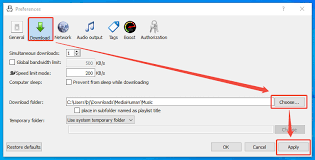
- Choose your preferred output format and audio quality in the preferences menu.
- Click the download button, or use Start All if you queued multiple items.
- Open the output folder, or let the program sync finished tracks straight into iTunes.
A progress bar shows the status of each download, and you can keep adding new links to the queue while earlier ones are still processing.
System Requirements
- Windows users need Windows 10 or later with at least 100 MB of free disk space for the application itself, plus extra space for your downloaded music. Mac users need macOS 10.13 or later, available on both Intel and Apple Silicon. Linux users can install it on Ubuntu and most Debian based distributions. An active internet connection is required for downloading content, though playback of already converted files works fully offline.
How to Download MediaHuman YouTube to MP3 Converter?
The safest way to get the software is directly from the official MediaHuman website, where the installer is digitally signed and kept up to date with the latest YouTube changes. Downloading from the official source also means you automatically get bug fixes when YouTube updates its site, since the developer regularly pushes small patches to keep the converter working.
Avoid third party download mirrors that bundle the installer with extra toolbars or unrelated software. A genuine installer from the developer will never ask you to disable your antivirus or run a separate activator file.
Is MediaHuman YouTube to MP3 Converter Safe and Legal to Use?
The software itself is safe when downloaded from the official source. It does not contain malware, and it does not modify other parts of your system.The legal side depends entirely on what you download and where you live. Saving audio that you own the rights to, that is in the public domain, that is released under a Creative Commons license, or that the creator has explicitly allowed for personal download is generally fine.
Downloading copyrighted music or commercial soundtracks without permission can violate copyright law in many countries and also goes against YouTube’s terms of service. Use the tool for content you have the right to save, such as your own uploads, royalty free music, podcasts, lectures, or tracks with an explicit free download license.
Pros and Cons
Advantages
The program is completely free with no forced trial period. Audio quality reaches up to 320 kbps. It supports a long list of platforms beyond YouTube. Playlist and channel downloading saves a lot of manual work. Tag editing and iTunes syncing keep a music library organized without extra software. The interface is available in many languages.
Limitations
The application is desktop only, so there is no official mobile app. Download speed and reliability depend on changes YouTube makes on its end, which occasionally requires waiting for an update. Some advanced users may find the interface less customizable compared to command line tools.
Alternatives Worth Knowing
A few other tools cover similar ground if you want to compare options. 4K YouTube to MP3 offers a similar feature set with a paid pro tier for extra speed. Online web based converters skip installation entirely but usually limit file size, batch downloads and audio quality. Command line tools such as yt-dlp give the most control and the highest flexibility but require comfort with a terminal interface. MediaHuman YouTube to MP3 Converter sits in the middle: more capable than a basic web converter, and easier to use than a command line tool.
Frequently Asked Questions
Is MediaHuman YouTube to MP3 Converter free?
Yes, the core application is free to download and use, with no required payment to convert audio.
Does it work on Mac and Linux, or only Windows?
It is available for Windows, macOS and Linux, with nearly identical features across all three platforms.
What audio formats can I save files in?
You can choose MP3, AAC (M4A) or OGG, or keep the original audio stream without any conversion.
Can I download an entire playlist or channel at once?
Yes, pasting a playlist or channel link automatically queues every video, and you can also subscribe to get new uploads downloaded automatically.
Is converting YouTube videos to MP3 legal?
It depends on the content. Downloading audio you own the rights to or that is licensed for free download is generally fine, while saving copyrighted commercial music without permission is not.
Will using this tool slow down my computer?
No, the application is lightweight and only uses noticeable resources while actively downloading or converting a file.
Final Verdict
MediaHuman YouTube to MP3 Converter remains one of the most complete free tools for turning YouTube and other online audio into local MP3 files. The combination of playlist support, automatic tag editing, iTunes integration and broad platform compatibility makes it a practical choice for building an offline music library without paying for software. As long as you stick to content you have the right to download, it is a reliable and safe option for both casual listeners and people managing larger audio libraries.
