

Comet Browser is a revolutionary AI-powered web browser developed by Perplexity that transforms how you browse the internet by automating routine tasks and providing intelligent assistance directly within your browser. Unlike traditional browsers that simply display web pages, Comet Browser acts as a personal digital assistant capable of understanding your needs, automating complex workflows, and enhancing your overall productivity in ways conventional browsers cannot match.
What is Comet Browser?
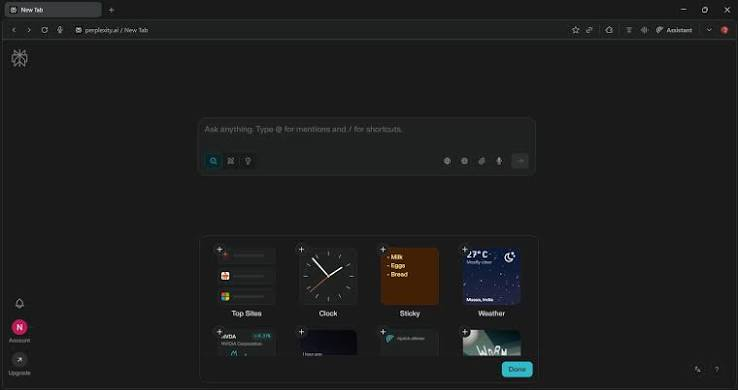
Comet Browser is an advanced web browsing platform that integrates artificial intelligence technology to streamline online activities and eliminate repetitive manual tasks. Built on Chromium architecture, it combines the reliability of Google Chrome with powerful AI capabilities that understand natural language commands and execute complex actions on your behalf. This groundbreaking browser represents a significant shift in web browsing philosophy by introducing an intelligent layer between users and the internet.
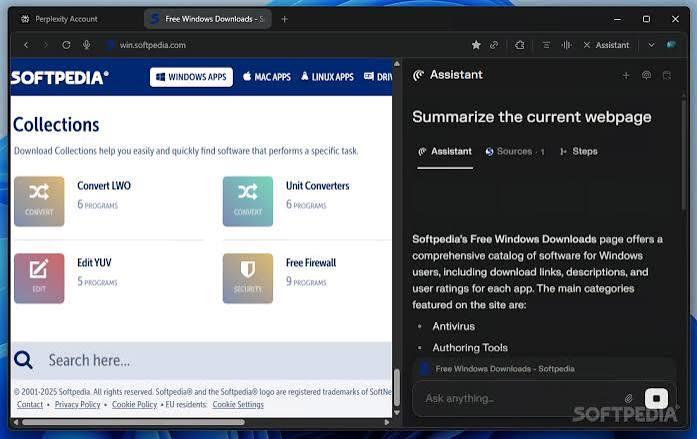
The browser leverages cutting-edge large language models to interpret user intentions, navigate websites autonomously, fill out forms intelligently, and complete multi-step tasks without requiring manual intervention. Whether you need to research information, manage schedules, or perform online shopping, Comet Browser understands context and adapts its assistance accordingly.
Key Features and Capabilities of Comet Browser
AI-Powered Personal Assistant Integration
Comet Browser includes an integrated AI assistant that functions as your personal digital aide. This assistant can summarize lengthy articles in seconds, organize your browser tabs intelligently, draft emails, and manage your calendar seamlessly. The AI understands natural language commands, meaning you can request assistance using conversational language rather than technical commands or specific syntax. For instance, you can tell the browser to highlight important points in an article or create a structured outline from scattered information online.
The assistant learns from your browsing patterns and usage habits to provide increasingly personalized suggestions and automated workflows that align with your specific needs. Over time, the AI becomes more intuitive about what you need before you explicitly request it.
Autonomous Task Automation
One of the most powerful capabilities of Comet Browser is its ability to autonomously complete complex tasks that typically require extensive manual effort. The browser can handle sophisticated operations including booking hotel accommodations by comparing prices and amenities across multiple travel websites, managing appointments by accessing your Google Calendar or Outlook calendar, conducting comprehensive product research and price comparisons, filling out multi-page forms with accurate information, and monitoring websites for price drops or inventory changes.
This automation capability extends to email management where the AI can draft responses, organize messages into categories, and flag important communications requiring your attention. The browser accomplishes these tasks by securely accessing integrated services like Google and Microsoft Outlook through authorized connections.
Chromium-Based Architecture and Extension Support
Comet Browser is constructed on the Chromium engine which powers Google Chrome and numerous other browsers. This foundation ensures full compatibility with Chrome extensions and web applications, allowing you to install thousands of tools and utilities directly from the Chrome Web Store. Any extension that works on Chrome will function identically on Comet Browser, providing unlimited customization possibilities for your browsing environment.
The familiar Chromium foundation means users transitioning from Chrome experience virtually no learning curve. The interface layout, keyboard shortcuts, and general navigation patterns remain consistent, allowing you to boost productivity without adjusting to an entirely new browser paradigm.
User-Friendly Natural Language Interface
Interacting with Comet Browser requires no programming knowledge or technical expertise. You communicate with the AI using everyday language just as you would speak to another person. This natural language interface dramatically reduces friction and learning time compared to traditional automation tools that demand users learn specialized syntax or command structures. Whether you are a tech expert or a casual internet user, the conversational interface welcomes both audiences equally.
The browser translates your natural language requests into executable actions, abstracting away the technical complexity. This approach makes powerful automation accessible to anyone regardless of technical background.
Privacy Protection and Local Data Storage
Your personal browsing information, saved passwords, bookmarks, and browsing history remain stored locally on your computer rather than being transmitted to Perplexity servers. This approach significantly enhances privacy by keeping sensitive data within your direct control. While the browser does send some information to Perplexity servers to power AI features, the architecture minimizes data transmission and gives you granular control over what information is shared.
This privacy-first approach contrasts sharply with many cloud-based services that require extensive data sharing for functionality. You gain AI capabilities without compromising your privacy expectations.
Free Access for All Users
Comet Browser was initially available exclusively to Perplexity Max subscribers as a premium feature. However, Perplexity has democratized access by making the browser completely free for all users regardless of subscription status. This decision significantly expands accessibility and allows anyone with Windows 10 or 11 to experience advanced AI-powered browsing without financial barriers.
Why Choose Comet Browser Over Alternative Browsers?
Productivity Enhancement
Comet Browser dramatically accelerates workflow completion through intelligent automation. Tasks that consume hours of manual clicking, typing, and switching between tabs can be completed in minutes through conversational requests. This productivity boost proves particularly valuable for professionals handling repetitive administrative tasks, researchers managing extensive information gathering, and anyone seeking to reclaim time for meaningful work.
Intelligent Context Understanding
Unlike basic automation tools that follow rigid scripts, Comet Browser understands context and adapts behavior accordingly. The AI comprehends nuance, interprets implied requests, and makes intelligent decisions about how to accomplish your goals. This context awareness enables the browser to handle variations and exceptions that would confuse script-based automation.
Seamless Integration with Existing Tools
Because Comet Browser builds on Chromium and extends Chrome compatibility, you maintain access to your entire existing extension library. This approach allows you to enhance rather than replace your current workflow. Your favorite productivity tools, password managers, and utilities continue functioning exactly as they do in Chrome while gaining the added benefit of AI automation.
Elimination of Routine Tasks
The browser excels at identifying and automating routine tasks that waste time without requiring creativity or decision making. Booking reservations, comparing prices, filling forms, and managing schedules can all become invisible background processes. This automation frees your mental energy for tasks requiring actual human intelligence and creativity.
Cost Effectiveness
Because Comet Browser is free, you access powerful AI capabilities without subscription fees. Compare this to specialized automation platforms, virtual assistants, or hiring additional staff to handle routine administrative tasks. The savings compound significantly over time while improving both efficiency and work satisfaction.
Technical Specifications and Requirements
System Requirements
- Comet Browser operates on Windows 10 and Windows 11 platforms with a modest file size of approximately 14 megabytes. The application requires only standard system resources and runs efficiently even on older computers with limited RAM. Installation takes minutes and requires no complex configuration.
- The browser functions optimally with internet connectivity though many features work in offline mode. A broadband connection ensures smooth AI processing and fast access to web-based services that the browser automates.
Version Information
The current stable version is Comet Browser 140.0 which includes performance improvements and enhanced AI capabilities. Regular updates introduce new features and improve existing functionality based on user feedback and advancing AI technology. Perplexity maintains an active development schedule ensuring the browser remains at the forefront of AI-powered browsing technology.
Software Architecture
Built on the Chromium engine used by Google Chrome, Comet Browser inherits the robust architecture, security updates, and performance optimizations from one of the world’s most widely-used browsers. This proven foundation means you benefit from years of refinement and countless security patches.
Use Cases and Real-World Applications
Professional Work and Business Automation
Business professionals can leverage Comet Browser to automate administrative overhead. Sales teams can research prospects faster, customer service representatives can draft contextually appropriate responses, and project managers can consolidate information from multiple sources automatically. The time saved on routine work directly translates to increased productivity and reduced operational costs.
Research and Information Gathering
Students and researchers can dramatically accelerate their research process by requesting the browser to find information on specific topics, organize findings, create outlines, and generate summaries. The AI understands research methodologies and can structure information according to academic or professional standards. What traditionally required hours of manual research and note-taking now happens in minutes.
E-commerce and Price Comparison
Online shoppers benefit from Comet Browser’s ability to compare prices across multiple retailers, identify special deals, and monitor product availability. The browser can automatically alert you when prices drop on items you are tracking or find products matching specific criteria from your natural language description.
Travel Planning and Booking
Travelers can request the browser to compare flight prices, check hotel availability, read reviews, and complete bookings. The AI understands travel preferences and can prioritize recommendations based on factors like location, budget, and amenities. Complex multi-leg trips with various accommodations become simple through conversational requests.
Email and Communication Management
The AI assistant helps manage email overload by drafting responses, organizing messages, flagging priorities, and suggesting appropriate replies based on context. Communication professionals can maintain consistent voice and tone across numerous messages while reducing time spent on routine correspondence.
Financial and Administrative Tasks
Personal finance management becomes easier when the browser can track expenses, compare service providers, fill out financial forms, and research insurance options. The AI approach removes the frustration from administrative work that most people find tedious.
Advantages and Disadvantages of Comet Browser
Significant Advantages
The primary advantage is unprecedented productivity improvement through intelligent automation. Time savings compound across numerous daily tasks, freeing hours for meaningful work. The natural language interface makes advanced automation accessible without technical expertise. Free availability removes financial barriers to access. The privacy-first approach protects sensitive data while delivering AI capabilities. Chromium compatibility ensures you keep your favorite extensions.
Limitations and Considerations
The browser currently runs only on Windows platforms with no available macOS or Linux versions. Some AI features depend on reliable internet connectivity. Certain complex websites with unusual interfaces may confuse the automation system. Initial setup requires connecting services like Google and Outlook for authorization which raises legitimate security questions. The technology is relatively new and continues evolving which may mean feature instability in some cases.
Setup, Installation and Getting Started
Installation Process
Installation requires downloading approximately 14 megabytes from the official Perplexity website or authorized distribution channels. The installation wizard guides you through basic setup including choosing your default search engine, importing bookmarks from existing browsers, and configuring privacy settings. The entire process takes less than five minutes for most users.
Initial Configuration
After installation, you should customize your settings to match your preferences. Configure which services the browser can access, set privacy levels for data sharing, and organize your extension collection. Connect your Google and Outlook accounts if you want the AI assistant to access your calendar and email for automation purposes.
First Steps with AI Assistant
Begin by asking simple requests like summarizing articles or organizing your bookmarks. Gradually progress to more complex tasks as you become comfortable with the AI capabilities. The browser improves at understanding your preferences and communication style with increased usage.
Security and Privacy Considerations
Data Security Measures
Comet Browser implements industry-standard encryption for transmitted data and uses secure connections to websites you visit. Your passwords are stored securely and never transmitted to Perplexity servers. The browser receives regular security updates from the Chromium project addressing newly discovered vulnerabilities.
However, you should recognize that connecting Google and Outlook accounts grants the browser access to email and calendar data. While Perplexity claims secure handling of this data, you should evaluate this risk based on your comfort level with third-party access to personal information.
Privacy Best Practices
Use the browser’s privacy controls to limit data sharing with Perplexity. Review permissions before allowing the browser to access services. Consider which personal accounts you authorize for browser automation. Treat account credentials with care if the browser stores them. Monitor the browser’s behavior to ensure it accesses only authorized services.
Comparison with Alternative Browsers
Unlike Google Chrome which serves primarily as a browsing platform without built-in automation, Comet Browser adds intelligent task completion capabilities. Edge offers productivity features but lacks AI-powered automation. Firefox emphasizes privacy but offers limited automation tools. Safari is restricted to Apple products and includes minimal automation.
Specialized automation platforms like Selenium or Zapier require technical knowledge and scripting. Virtual assistant services like Siri or Alexa lack deep web integration and browsing capabilities. Personal assistant services demand significant expense. Comet Browser bridges this gap by combining browser functionality with intelligent automation at no cost.
Frequently Asked Questions About Comet Browser
Is Comet Browser Truly Free?
Yes, Comet Browser is completely free to download and use. While Perplexity offers a paid Max subscription for expanded AI capabilities, the browser itself imposes no fees or limitations on free users.
Does Comet Browser Work with All Websites?
Most popular websites work flawlessly with Comet Browser. However, some unusual interfaces or heavily customized web applications may occasionally confuse the AI automation system. The technology continues improving with regular updates.
How Does Comet Browser Protect My Privacy?
Your browsing data stays locally stored on your computer. Perplexity minimizes server transmissions and uses encryption for any data sharing. However, connecting personal accounts like Google and Outlook does grant the browser access to those services.
Can I Use My Chrome Extensions in Comet Browser?
Yes, the Chromium foundation ensures complete compatibility with Chrome extensions. You can install any extension from the Chrome Web Store directly into Comet Browser.
What Operating Systems Does Comet Browser Support?
Currently Comet Browser runs exclusively on Windows 10 and Windows 11. Mac and Linux versions are not yet available though Perplexity may expand platform support in future updates.
How Frequently Does Comet Browser Receive Updates?
Perplexity releases updates regularly to improve features, enhance AI capabilities, and patch security vulnerabilities. Updates typically install automatically without user intervention.
Does Comet Browser Require an Internet Connection?
Most features benefit from internet connectivity though basic browsing works offline. AI features and automation capabilities require active internet connection for real-time processing.
How Does Comet Browser’s AI Learn About My Preferences?
The AI learns through interaction patterns and previous requests. As you use the browser, it builds a profile of your communication style, preferences, and typical tasks. This learning happens locally with minimal data transmission.
Future Development and Roadmap
Perplexity continues actively developing Comet Browser with planned features including expanded platform support for macOS and Linux, enhanced AI capabilities powered by advancing models, deeper integrations with more services and applications, and improved accessibility features. The company has publicly committed to maintaining the browser as free software regardless of future business model changes.
Conclusion and Recommendations
Comet Browser represents a significant advancement in web browsing technology by introducing affordable, accessible AI-powered automation that transforms how people work online. For anyone seeking to eliminate routine administrative tasks, research information faster, or simply reclaim hours in their daily schedule, Comet Browser deserves serious consideration. The combination of intelligent automation, free availability, privacy protection, and Chrome extension compatibility creates a compelling value proposition. While the browser is still relatively new and platform-limited to Windows, the core functionality delivers genuine productivity improvements for most users. Download Comet Browser today to experience the future of intelligent web browsing.
The browser costs nothing to try and requires just minutes to install. Begin with simple tasks like summarizing articles, then progress to more complex automation as you become comfortable with AI-powered browsing. Your productivity awaits in an entirely new browsing paradigm that adapts to you rather than forcing you to adapt to rigid interfaces. The future of web browsing is intelligent, conversational, and automated. Comet Browser brings that future to your Windows computer today at absolutely no cost.
