
AI Voice Changer is a cutting-edge real-time voice modification application that leverages artificial intelligence technology to transform your voice with natural, smooth, and precise effects. This comprehensive software solution serves content creators, gamers, streamers, and professionals who need sophisticated voice manipulation capabilities across multiple platforms.
What Is AI Voice Changer Software?
AI Voice Changer represents a revolutionary approach to voice processing technology by combining deep learning algorithms with advanced audio processing techniques. The application enables users to modify voice characteristics including timbre, pitch, intonation, and tone in real-time during active recording or streaming sessions. Unlike traditional voice filters, this AI-powered software analyzes vocal patterns and applies intelligent transformations that maintain natural sound quality while delivering professional-grade modifications.
The software operates on Windows 10 and higher versions, requiring minimal system resources while providing maximum vocal transformation capabilities. Whether you need subtle voice adjustments for privacy protection or dramatic character voice transformations for entertainment purposes, AI Voice Changer delivers comprehensive solutions for diverse audio manipulation needs.
Key Features of AI Voice Changer 5.5.1
Dual Recording Modes
The software provides two distinct operational modes designed for different user requirements and workflows. The Recording Mode allows you to capture audio first and then apply voice effects during the processing phase. This approach offers greater control and flexibility for those who prefer editing audio after recording. The Real-Time Mode enables instantaneous voice conversion with immediate effect application, making it perfect for live streaming, gaming, video conferencing, and interactive online communication.
Extensive Voice Effects Library
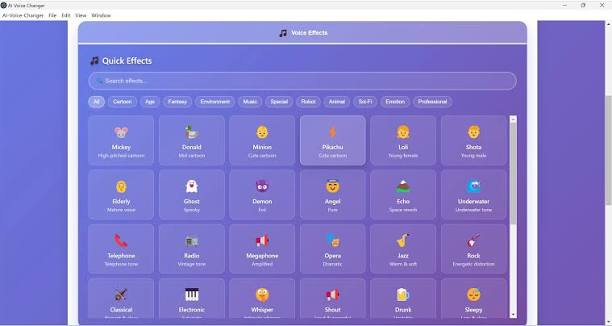
AI Voice Changer includes over 100 voice effects organized into multiple categories for easy selection and application. Character voice effects include popular fictional personalities such as Mickey, Donald Duck, Minions, and Pikachu. These effects transform your voice to match beloved cartoon characters and entertainment icons, making them ideal for content creation and entertainment purposes. Age transformation effects encompass Lolita, Shota, and Elderly voice options that realistically adjust vocal characteristics to match different age groups. These effects prove particularly valuable for voice acting, dubbing, and character-driven content production.
Fantasy voice effects feature Ghost, Demon, and Angel voiceovers that create supernatural and ethereal vocal textures. These transformations work exceptionally well for gaming content, horror productions, and creative entertainment projects. Environmental audio effects replicate acoustic spaces including Echo, Underwater, Phone, Broadcast, and Loudspeaker environments. These effects simulate how your voice would sound in different physical locations and communication mediums, enhancing immersion and realism.
Music style effects enable vocal transformations that match specific musical genres including Opera, Jazz, Rock, Classical, and Electronic music styles. These effects apply genre-appropriate vocal characteristics and tonal qualities to your speech. Emotional expression effects convey different psychological states including Sadness, Happiness, Angry, and Fear. These effects modulate vocal patterns to express specific emotions, enhancing the emotional impact of your voice content.
Additional specialized effects include Whispering, Shouting, Drunk, Sleepy, and Excited speech patterns. Robot, Cyborg, and AI voice effects create mechanical and synthetic vocal qualities. Animal effects transform your voice into Chipmunk, Bear, and Cat vocalizations. Science fiction effects produce Alien, Spaceship, and Hologram voice characteristics. Professional voice effects include Narrator, Announcer, and Teacher voice options that replicate professional speaking styles and vocal qualities associated with specific professions.
Primary Applications and Use Cases
Gaming and Voice Chat Enhancement
AI Voice Changer enables gamers to adopt unique character voices during multiplayer gaming sessions and voice chat interactions. Players can differentiate their voices from teammates, create distinctive gaming personas, and enhance the entertainment value of gaming experiences. The real-time processing ensures voice effects apply seamlessly during active gameplay without introducing noticeable latency or audio delays.
Live Streaming and Content Production
Content creators and streamers leverage AI Voice Changer to develop memorable vocal identities and character-driven content. The software enables streamers to adopt different voices for multiple characters, creating engaging narrative-driven content that entertains audiences and builds distinctive personal brands.
Voice Dubbing and Avatar Voiceovers
Professional voice actors and content producers use the software for dubbing projects, avatar animation voiceovers, and video game character voice acting. The extensive voice effects library provides authentic character voices that reduce the need for hiring multiple voice talent professionals, significantly reducing production costs.
Privacy Protection and Voice Disguising
Users concerned with online privacy can utilize voice disguising capabilities to mask their natural voice characteristics during video calls, conference meetings, and online interactions. This functionality provides security-conscious individuals with effective voice anonymization tools without requiring expensive commercial solutions.
Technical Specifications and System Requirements
- AI Voice Changer operates efficiently on Windows 10 version 14316.0 or higher versions. The application requires minimal system resources, making it accessible to users with modest computer specifications. The current version 5.5.1 maintains optimized performance while delivering professional audio quality outputs.
- The installation package measures approximately 111 megabytes in size, while the portable version requires only 86 megabytes of disk space. Both versions provide identical functionality, with the portable option offering convenience for users who prefer to run applications without formal installation procedures.
- The software integrates seamlessly with various communication platforms, recording applications, and content creation tools through standard audio interface protocols. This compatibility ensures the voice effects apply across virtually all applications that utilize microphone input or audio processing features.
How AI Voice Changer Works?
The application leverages neural network technology to analyze incoming audio streams and apply sophisticated voice transformations. When you activate a specific voice effect, the AI algorithms process your vocal input in real-time or during batch processing operations. The software identifies vocal characteristics and applies targeted modifications that preserve speech intelligibility while achieving the desired vocal transformation. The deep learning models underlying the software have been trained on extensive voice datasets, enabling accurate voice modification that sounds natural rather than artificially processed.
This technological approach contrasts sharply with older voice changing software that produces obviously robotic or distorted audio output. During real-time operation, the software maintains minimal audio latency, typically processing voice transformations within milliseconds. This responsiveness ensures users experience natural conversation flow without noticeable delays between speaking and hearing the transformed voice output.
Installation and Setup Process
Installing AI Voice Changer requires straightforward procedures compatible with standard Windows software installation processes. Download the installation file from official distribution channels, execute the installer, and follow the on-screen installation prompts. The setup procedure typically completes within minutes, with minimal configuration required before using the software.
For portable version usage, extract the archive file to your preferred directory and execute the main application file directly. The portable version requires no installation process, installation registry modifications, or system configuration changes, making it ideal for temporary usage or computer systems where software installation requires administrative approval.
After installation or extraction, launch the application and select your preferred input audio device from the device selection menu. Connect microphone hardware or utilize built-in computer microphones as your audio input source. The software automatically configures audio settings for optimal performance.
Advantages of Using AI Voice Changer
- The software delivers numerous advantages for various user categories and professional applications. Gamers benefit from distinctive voice characterization that enhances multiplayer gaming experiences and entertainment value. Content creators gain access to professional voice effects without requiring expensive voice acting talent or elaborate audio processing equipment.
- Streamers and YouTubers leverage the software to develop memorable vocal identities and character-driven content that differentiates their channels from competitors. The real-time functionality enables spontaneous voice transformation during live broadcasts without additional editing requirements.
- Privacy-conscious users appreciate the voice disguising capabilities that protect personal voice biometrics during online interactions. The software enables effective voice anonymization without requiring additional hardware or complex technical setup procedures.
- Business professionals utilize narrator and announcer voices for creating professional training materials, corporate presentations, and instructional content without hiring professional voice talents. This approach significantly reduces content production costs while maintaining professional audio quality.
Comparison with Alternative Voice Changing Solutions
Compared to other voice changing software available in the market, AI Voice Changer distinguishes itself through comprehensive effect libraries and real-time processing capabilities. Traditional voice changing applications often provide limited effect selections or require offline audio processing. This software combines the convenience of real-time voice transformation with the quality and variety of professional audio editing solutions. The AI-powered approach differs fundamentally from rule-based voice modification systems used in older software. Neural network technology delivers more natural and convincing voice transformations compared to algorithmic pitch shifting and filtering techniques employed by competing solutions.
The software’s integration with multiple application platforms and input devices exceeds the compatibility limitations of many alternative voice changers. Users can apply voice effects across gaming platforms, communication applications, streaming software, and recording tools simultaneously.
Performance and Audio Quality
AI Voice Changer maintains excellent audio quality throughout the voice transformation process. The software utilizes high-quality audio codecs and processing algorithms that preserve vocal clarity and intelligibility across all voice effect selections. Users report that transformed voices sound authentic and natural rather than obviously artificial or heavily processed.
The real-time processing engine operates efficiently on modern computer systems, maintaining consistent performance even during extended usage sessions. Audio latency remains within acceptable ranges for interactive applications including gaming and live video communication.
The software performs optimally with quality microphone hardware but functions adequately with standard computer built-in microphones. Microphone upgrade recommendations enhance overall voice quality and effect clarity but remain optional for basic usage purposes.
Compatibility and Integration
AI Voice Changer integrates seamlessly with popular streaming platforms including Twitch, YouTube Live, and Discord. The software works with recording applications such as OBS Studio, Audacity, and Adobe Premiere Pro. Video conferencing platforms including Zoom, Skype, Microsoft Teams, and Google Meet all support voice effect application through the software’s virtual audio device capabilities.
Gaming platforms and voice communication systems benefit from the software’s broad compatibility across gaming console software, PC games, and multiplayer gaming platforms. The virtual audio interface approach ensures compatibility without requiring individual application modifications or specialized configuration procedures.
Security and Privacy Considerations
The software respects user privacy by processing audio locally on your computer system. No audio data transmits to external servers or cloud-based processing infrastructure. Voice transformation calculations occur entirely within your computer, ensuring complete confidentiality of all voice recordings and communication. The application requires no account creation or personal information submission for basic usage. Users can immediately begin voice transformation without registration, login procedures, or privacy-invasive data collection practices.
For users concerned with voice biometric privacy protection, the voice disguising capabilities prevent unauthorized voice recognition systems from identifying users based on vocal characteristics. This functionality addresses growing concerns regarding voice-based identification and biometric data collection practices.
Updates and Feature Enhancements
The software receives regular updates that introduce new voice effects, improve existing transformations, and enhance overall performance. Version 5.5.1 represents the latest release with optimized performance and expanded effect libraries compared to earlier versions.
Users benefit from ongoing development that responds to user feedback and emerging technological capabilities. The developers actively maintain compatibility with new Windows versions and communication platforms, ensuring the software remains functional with current system configurations and applications.
Download and Installation Resources
AI Voice Changer 5.5.1 is available in both standard installation and portable versions. The standard installation version provides optimal integration with Windows system audio capabilities. The portable version offers flexibility for users who prefer mobile applications or require temporary usage without permanent system modifications.
Multiple reliable distribution channels provide secure downloads with verified file integrity. Users should download exclusively from official sources to ensure authenticity and protection against modified versions containing malware or adware.
Conclusion
AI Voice Changer 5.5.1 represents the current standard for real-time voice modification software combining artificial intelligence technology with extensive effect libraries and professional audio quality. Whether you require voice transformation for gaming, content creation, privacy protection, or professional applications, the software delivers comprehensive solutions meeting diverse user needs. The intuitive interface, extensive effect selection, and seamless platform integration make AI Voice Changer accessible for both casual users and professional audio specialists. The real-time processing capabilities eliminate time-consuming audio editing workflows while maintaining professional-quality voice transformations.
For anyone seeking authentic, natural-sounding voice modification with minimal technical complexity, AI Voice Changer provides the ideal solution. The software’s combination of advanced AI technology, extensive effects library, and straightforward operation establishes it as the preferred choice for modern voice transformation requirements.
