

Bulk Image Downloader is a dedicated Windows application that lets you save entire photo galleries, image albums, and video collections from any website with a single click. Instead of manually right-clicking every image on a page, the software automatically scans any URL you provide, detects all downloadable media, and saves everything to your chosen folder in seconds. It is one of the most capable and widely used bulk image saving tools available for Windows in 2026.
What Is Bulk Image Downloader?
Bulk Image Downloader is developed for photographers, designers, researchers, digital archivists, and everyday users who regularly need to download multiple images from the web. The application combines an intelligent media scanner, a built-in browser extension, and an automated download queue into one compact tool. It handles everything from simple gallery pages to complex multi-page forum threads and obfuscated image hosts without requiring any technical knowledge from the user.
How Bulk Image Downloader Works?
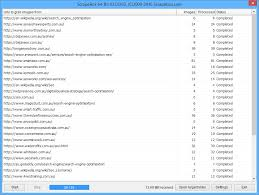
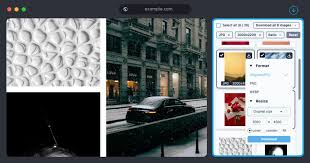
Using Bulk Image Downloader is a three-step process. First, you paste the URL of any web gallery into the application or right-click the page in your browser and choose the BID option from the context menu. Second, the software scans the link and displays a preview of every image and video it has detected. Third, you select the files you want or choose to download the entire collection, specify an output folder, and click download. The application handles the rest automatically, including retrying failed files and resuming interrupted transfers.
Key Features of Bulk Image Downloader
Bulk Image Downloader includes a broad set of features that set it apart from basic download managers and browser extensions.
- One-click gallery saving is the core function of the software. The application downloads complete photo albums and image collections from a single URL without any manual selection unless you want it. This alone saves hours of repetitive work when archiving large galleries. Native browser integration means the tool works directly inside Chrome, Firefox, and Edge through a lightweight extension. You can right-click any gallery page or image link in your browser and send it to Bulk Image Downloader instantly without switching windows or copying URLs manually.
- Multi-page and forum support allows the software to scan and download from complex gallery structures, including paginated albums, VBulletin forum threads with attached images, and multi-level nested galleries that defeat most other download tools. Automatic redirect and ad bypass is built into the scanner. The application intelligently follows obfuscated links from image hosting redirect services, cutting through interstitial ads and pop-ups to retrieve only the actual image files you need.
- Video downloading is supported alongside images. The tool grabs thumbnail previews and full video files from popular video hosting platforms, which removes the need for a separate video downloader in most workflows. Intelligent download validation runs automatically in the background. Every downloaded file is checked for integrity. Corrupt or incomplete files are detected and re-downloaded without any user intervention, so you always end up with a complete and uncorrupted collection.
- Batch queue management lets you line up multiple gallery download jobs. The queue runs sequentially and unattended, making it practical to set up a large batch before stepping away from your computer. Custom filename and folder organization options give you control over how downloaded files are named and sorted. You can use templates based on the source URL, sequence numbers, or original filenames to keep your downloads organized automatically. Parallel downloading with configurable thread counts speeds up the process significantly on fast internet connections. You can adjust how many simultaneous connections the software uses to match your bandwidth.
Supported Websites and Compatibility
Bulk Image Downloader works with an extensive range of websites. Its intelligent scanner is not limited to a predefined list of supported sites. As long as a page contains images or videos, the software can detect and download them. It has specific optimized support for major image hosting services, photography platforms, social media galleries, and image-heavy forums. It also handles sites that use JavaScript to load images dynamically, which is a common limitation of simpler tools.
System Requirements
- Bulk Image Downloader runs on Windows 10 and Windows 11. It supports both 32-bit and 64-bit versions of Windows. The application is lightweight and does not require high system resources. Browser extension support is available for Google Chrome, Mozilla Firefox, and Microsoft Edge.
Bulk Image Downloader vs Manual Saving
Manually saving images from a gallery involves right-clicking each image, selecting save, choosing a destination, and confirming the filename one image at a time. For a gallery of 50 images that process takes roughly 10 to 15 minutes. For a gallery of 500 images it becomes impractical. Bulk Image Downloader completes the same task in under a minute regardless of gallery size. It also avoids human error such as saving duplicates, missing images, or accidentally saving low-resolution thumbnails instead of full-size originals.
Bulk Image Downloader vs Browser Extensions
Basic browser extensions for downloading images typically grab only the visible images on a single page. They do not follow pagination, do not bypass redirects, do not validate downloads, and do not support video. Bulk Image Downloader handles all of these scenarios natively and provides a dedicated interface for managing and reviewing what it finds before downloading.
Who Should Use Bulk Image Downloader?
Bulk Image Downloader is useful for a wide range of users. Photographers who want to archive reference images or download client galleries benefit from the batch automation. Graphic designers who collect visual inspiration from multiple sources can save entire boards and galleries in one session. Researchers and journalists who need to preserve web content before it disappears find the tool invaluable. Forum members who want to save attached image collections from long threads use it regularly. Anyone who downloads more than a handful of images per week will save meaningful time with this software.
Software Details
The current version of Bulk Image Downloader is 6.64. The developer is Bulk Image Downloader Software. The application runs on Windows and supports multiple interface languages. The installer file size is approximately 34 MB. A browser extension is available separately for Chrome, Firefox, and Edge from the official website at bulkimagedownloader.com.
Frequently Asked Questions
Is Bulk Image Downloader free to use?
Bulk Image Downloader offers a free trial version. The full version with all features requires a paid license available from the official website.
Does Bulk Image Downloader work on Mac?
The current version is designed for Windows only. Mac users would need to use an alternative tool or run Windows in a virtual machine.
Can Bulk Image Downloader download videos?
Yes, the software supports video downloads from popular video hosting sites in addition to image galleries.
Does the software bypass login-protected galleries?
Bulk Image Downloader can download from pages that are accessible when you are logged into your browser, since it integrates with your existing browser session through the extension.
Can I pause and resume downloads?
Yes, the application supports pausing, resuming, and retrying downloads automatically when connections are interrupted.
Does it download images in their original full resolution?
Yes, Bulk Image Downloader targets full-resolution source images rather than thumbnails, as long as the source page links to them.
Conclusion
Bulk Image Downloader 6.64 is a reliable and efficient solution for anyone who needs to save large numbers of images or videos from websites without doing it manually. Its combination of an intelligent multi-page scanner, browser integration, automatic validation, and queue management makes it significantly more capable than browser extensions or manual saving. For Windows users who regularly work with online image galleries, it is one of the most practical tools available in 2026.
