
![CyberLink AudioDirector Ultra 2026 v16.5.6525.0 [Latest]](https://pcfile.site/wp-content/uploads/2026/06/a.webp)
CyberLink AudioDirector Ultra 2026 is a professional audio editing software for Windows that combines AI-powered restoration tools, multi-track mixing, and advanced sound design capabilities in a single, intuitive workspace. Whether you are a filmmaker syncing dialogue, a podcaster removing background noise, or a musician mastering a final mix, AudioDirector Ultra delivers studio-grade results without requiring a professional audio engineering background.
What Is CyberLink AudioDirector Ultra?
CyberLink AudioDirector Ultra is the flagship tier of CyberLink’s audio editing suite. It sits above the Essential and Standard editions and unlocks the complete toolset including AI noise reduction, automated dialogue replacement, spatial audio mixing, multi-channel output, and full H.265 video support. The 2026 release, version 16.5.6525.0, is a 64-bit application built for Windows 10 and Windows 11, including ARM64 devices powered by Qualcomm Snapdragon processors.The software serves three main use cases.
First, it functions as a standalone audio editor for recording, restoration, and mixing. Second, it works as a companion app to CyberLink PowerDirector, allowing editors to hand off audio tracks for precision work and return them to the video timeline. Third, it acts as a broadcast and podcast production tool where clean, level-consistent audio is non-negotiable.
Key Features of CyberLink AudioDirector Ultra 2026
AI-Powered Audio Restoration
The most impactful additions in recent versions of AudioDirector are its artificial intelligence restoration tools. These go far beyond basic noise gates or simple equalizer adjustments.The AI Noise Reduction engine analyzes the entire frequency spectrum of a recording and separates signal from noise using machine learning models. It handles two distinct scenarios: auto-denoise mode for footage recorded outdoors or in acoustically poor rooms, and manual noise reduction mode where you isolate a reference noise sample, analyze it, and remove it across the entire clip. The result is a clean vocal or instrument track with none of the robotic artifacts that older spectral editing tools produce.The Declip tool repairs audio that was recorded too hot and distorted at the waveform peaks.
It reconstructs the clipped portions of the signal mathematically rather than simply cutting them off, which preserves transient detail that is otherwise lost. The Declick tool removes the pops and crackles common in vinyl recordings or poorly shielded microphone cables. The Hiss Removal tool targets high-frequency tape hiss from analog recordings, and the Hum Removal tool eliminates 50 Hz or 60 Hz electrical interference from power line noise.
Automated Dialogue Replacement and AV Sync
One of the headline features introduced in recent versions is Automated Dialogue Alignment. When a director records replacement dialogue in a studio after the original shoot, the timing rarely matches the lip movements perfectly. AudioDirector’s automated dialogue replacement tool analyzes the phoneme pattern of the original audio track and stretches or compresses the replacement recording to align with it precisely. This eliminates the tedious manual process of trimming, slipping, and nudging each word individually.
The AV sync correction tool addresses a separate but related problem: equipment-induced latency mismatches between camera and audio recorder. The tool uses a visually referenced editing interface where you can see both the video frames and the audio waveform simultaneously, making it possible to align voice-overs or sound effects to the exact frame.
Visual Repair Mode and Spectral Editing
Visual Repair mode is AudioDirector’s spectral editor. It displays audio as a frequency-over-time spectrogram rather than a conventional amplitude waveform. This view makes it possible to see individual noise artifacts as visible shapes in the frequency domain and remove them surgically using selection tools. You can isolate a single whistling sound at 3 kHz, a truck rumble below 80 Hz, or an air conditioning tone at a specific harmonic frequency and erase it without touching the surrounding audio. Time-based and frequency-based selection tools give complete control over what gets modified.
Multi-Track Editing and Timeline Tools
The AudioDirector timeline supports multiple audio tracks with per-track controls including mute, solo, record arm, and volume envelope keyframes. You can cut, copy, paste, or delete regions across tracks, add timeline markers for note-taking or sync reference points, zoom in to sample-level precision for tight edits, and normalize individual clips or entire mixes.
Volume envelope automation lets you draw gain changes directly on the waveform so that music ducks under dialogue, sound effects swell at precise moments, and ambient noise stays consistent across cut points. The mixer panel controls panning, levels, and channel routing for each track simultaneously.
Special Effects and Sound Design Tools
AudioDirector includes a comprehensive effects library covering the full range of production needs. Creative effects include reverb, delay, echo, chorus, flanger, and phaser for adding space and character to dry recordings. Character effects such as radio, telephone, and vintage filtering transform clean audio into stylized treatments for film and broadcast. The vocal removal effect separates the central vocal signal from a stereo mix, which is useful for karaoke production or for isolating instrumental tracks.
Pitch correction tools allow you to shift the pitch of a recording up or down in semitone increments without changing its duration, and time stretching tools allow you to lengthen or shorten a clip without altering pitch. You can also insert silence or calibrated noise at any point in the timeline, reverse any selected region, and adjust fade-in and fade-out curves with bezier precision.
Multi-Channel and Spatial Audio Support
AudioDirector Ultra supports production in stereo, 5.1 surround, and 7.1 surround formats. It can record from multiple audio sources simultaneously, which is essential for multitrack podcast or interview recording where each participant is on a separate channel. Channel routing controls let you assign specific tracks to specific output channels for delivery in broadcast or cinema formats.
Import, Export, and Format Support
The software imports audio and video from a wide range of formats. Supported video formats include AVI, DivX, DV-AVI, DVR-MS, HD MPEG-2, M2T, MKV, MOD, MOV, MP4, MPEG-1, MPEG-2, WMV, and WMV-HD, with full Ultra HD 2K and 4K resolution support. The addition of H.265 HEVC support in MP4 and MKV containers is significant because it allows editors working with modern mirrorless cameras and smartphones to import native footage without transcoding.
Export formats include MP3, WAV, WMA, M4A, FLAC, and MPEG. You can also burn audio directly to CD in MP3, WMA, M4A, WAV, or FLAC formats. Export settings expose bit depth, sample rate, bitrate, and channel configuration for full control over the output quality.
CyberLink Cloud Integration
AudioDirector integrates with CyberLink Cloud for uploading, downloading, and sharing media projects. You can also upload audio tracks to DirectorZone, CyberLink’s community platform, or download royalty-free sound clips from the DirectorZone library directly into your project.
Interface and Workflow
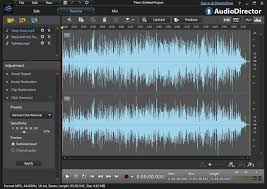
The AudioDirector interface is organized into a workflow-driven layout with dedicated panels for the media library, waveform editor, multi-track timeline, and mixer. The panel arrangement guides you from import through restoration, editing, effects, and mix down in a logical sequence without hiding tools behind complex menus.Beginners benefit from the one-click auto-restoration presets that apply denoise, declip, and normalize in a single action.
Experienced editors can bypass the presets and work directly in the spectral editor or timeline with granular parameter control. The help documentation is comprehensive and accessible from within the application.
System Requirements for CyberLink AudioDirector Ultra 2026
To run CyberLink AudioDirector Ultra 2026 on Windows, your system must meet the following requirements.
- Operating System: Microsoft Windows 10 or Windows 11 (64-bit only; Windows 11 ARM64 is supported)
- Processor: Intel Core i-series 6th generation or later; Intel Core i7-4770 Haswell 4th generation or later is required specifically for AI features; AMD Ryzen series or AMD Phenom II or later; AMD A8-7670K or AMD Ryzen 3 1200 or later for AI features; Qualcomm Snapdragon 8cx Gen 3 or Snapdragon X Elite
- Memory: 4 GB RAM minimum; 8 GB or more recommended
- Storage: 1 GB of available hard disk space
- Graphics: 128 MB VRAM minimum; 2 GB VRAM or more required for AI-powered features
- Display: 1024 by 768 resolution with 16-bit color or higher
- Audio: Windows-compatible sound card required
- Language Support: English, French, German, Italian, Spanish, Simplified Chinese, Traditional Chinese, Japanese, Korean
Technical Details
- Software Name: CyberLink AudioDirector Ultra 2026 Version: 16.5.6525.0 Developer: CyberLink Corp. License Type: Full Version Architecture: 64-bit File Size: 131 MB Operating System: Windows 10, Windows 11
Who Should Use CyberLink AudioDirector Ultra
CyberLink AudioDirector Ultra is best suited for video editors who need a dedicated audio repair and mixing tool to complement their video editing workflow, particularly those already using CyberLink PowerDirector. It is equally well-suited for podcast producers who record multi-guest sessions and need per-track noise reduction and level correction. Film and documentary makers who record dialogue on location and need to clean up room tone, handle sync issues, or replace dialogue in post will find the automated dialogue alignment and spectral repair tools essential. Musicians and home studio producers who want to clean up demo recordings or restore old audio also benefit from the restoration toolset.
Compared to Adobe Audition and iZotope RX, AudioDirector Ultra sits at a competitive price point while offering a feature set that covers the majority of professional production needs. Its deep integration with the broader CyberLink ecosystem is a significant advantage for users already invested in that workflow.
Frequently Asked Questions About CyberLink AudioDirector Ultra 2026
What is the difference between CyberLink AudioDirector Standard and Ultra?
The Ultra edition includes all features of the Standard edition plus AI noise reduction, automated dialogue replacement, spatial audio mixing, Visual Repair spectral editing, and full multi-channel output support.
Does CyberLink AudioDirector Ultra support Windows 11 ARM?
Yes. Version 16 added native support for Windows 11 ARM64, including devices running on Qualcomm Snapdragon 8cx Gen 3 and Snapdragon X Elite processors.
Can AudioDirector Ultra remove background noise from video recordings?
Yes. You can import video files directly into AudioDirector, apply noise reduction and restoration to the audio track, and export the cleaned audio back to the original video container without re-encoding the video stream.
What file formats can AudioDirector Ultra export to?
AudioDirector Ultra exports audio to MP3, WAV, WMA, M4A, FLAC, and MPEG. It also supports burning to CD and exporting for use in CyberLink PowerDirector timelines.
Is CyberLink AudioDirector Ultra suitable for podcast editing?
Yes. It supports multi-track recording from separate audio sources simultaneously, per-track noise reduction, volume leveling, and direct export to MP3 and other podcast delivery formats.
What are the AI features in AudioDirector Ultra 2026?
The AI features include AI-powered noise reduction, automated dialogue alignment, and spectral repair tools that use machine learning to reconstruct damaged or distorted audio signals.
Conclusion
CyberLink AudioDirector Ultra 2026 version 16.5.6525.0 is a complete professional audio editing solution that covers the full production pipeline from recording and restoration through editing, effects, mixing, and export. Its AI-powered repair tools handle the most common audio problems in video production and podcast recording automatically, while the spectral editing and multi-track timeline give experienced users the precision control they need for demanding projects. With native Windows 11 ARM64 support, H.265 video import, automated dialogue replacement, and a competitive price relative to Adobe Audition and iZotope RX, AudioDirector Ultra is a compelling choice for any Windows-based audio or video production workflow in 2026.
