

Online privacy has become one of the biggest concerns for internet users in 2026. Every website you visit, every search you run, and every link you click can be logged, tracked, and tied back to your identity. Tor Browser was built to solve exactly this problem. It lets you browse the internet anonymously by hiding your IP address and encrypting your traffic across multiple layers of relays before it ever reaches the website you are visiting.This guide explains what Tor Browser is, how it works, what changed in its latest release, and how to download and use it safely.
By the end, you will know whether Tor Browser is the right privacy tool for your needs and how it compares to a VPN or a standard browser like Chrome or Firefox.
What Is Tor Browser?
Tor Browser is a free, open source web browser developed by the Tor Project, a nonprofit organization focused on internet freedom and privacy research. It is built on top of Firefox and modified to route every connection through the Tor network instead of connecting directly to websites.The name Tor stands for The Onion Router, a reference to the way the network wraps your data in multiple layers of encryption, similar to the layers of an onion. Each layer is peeled away one at a time as your traffic passes through different volunteer operated servers around the world, known as nodes or relays.
By the time your request reaches its destination, the website has no reliable way of knowing your real IP address or physical location.Tor Browser is available for Windows, macOS, Linux, and Android, and it is completely free to download and use.
How Tor Browser Works?
Understanding the mechanics behind Tor Browser makes it easier to see why it offers stronger anonymity than a typical browser or even most VPN services.
The Onion Routing Process
When you open a website in Tor Browser, your connection does not go straight from your device to the destination server. Instead, it passes through three randomly selected relays.
- The entry node, which knows your real IP address but not your final destination.
- The middle relay, which only knows it received traffic from the entry node and must forward it to the exit node.
- The exit node, which sends your request to the actual website but does not know who originally sent it.
Because no single relay holds both pieces of information, your real identity and your browsing destination, it becomes extremely difficult for any one party to link the two together.
Built In Privacy Protections
Tor Browser ships with several protections enabled by default so you do not need to configure anything manually.NoScript comes preinstalled to control which scripts are allowed to run on a page, reducing the risk of browser fingerprinting and malicious code execution. HTTPS connections are enforced whenever a website supports them, encrypting the data exchanged between your browser and the site. The browser also blocks third party trackers, isolates cookies per website, and resists fingerprinting techniques that other browsers are often vulnerable to, such as detecting your screen resolution, fonts, or installed plugins.
Every browsing session also opens with a uniform window size and a generic user agent so that your specific device does not stand out from everyone else using Tor Browser at the same time.
Key Features of Tor Browser in 2026
Multi Layer Encryption and IP Masking
Your traffic is encrypted multiple times and decrypted one layer at a time as it passes through the Tor network, which keeps your IP address hidden from the websites you visit and from anyone monitoring the network.
New Identity and New Circuit Options
If you want to disconnect from your current set of relays, Tor Browser lets you request a brand new identity or a new circuit for the current site with a single click. This closes all open tabs and windows and reconnects you through a completely different path on the Tor network.
Bridges and Pluggable Transports
In countries or networks where Tor is blocked or heavily monitored, Tor Browser supports bridges and pluggable transports such as obfs4, which disguise Tor traffic so it looks like ordinary encrypted web traffic. This allows people in restricted regions to reach the open internet even when direct connections to Tor are censored.
Security Levels
You can choose between Standard, Safer, and Safest security levels depending on how much functionality you are willing to trade for additional protection. The Safest level disables JavaScript on all sites and restricts certain fonts and media formats, which is useful for high risk situations.
Tab and Session Management
Recent versions added smarter tab organization and, on Android, the option to lock your open tabs behind your fingerprint, face unlock, or device passcode. Closing the app still clears your entire session, so nothing persists between uses unless you explicitly save it.
Regular Security Updates
The Tor Project ships frequent updates that patch vulnerabilities inherited from the underlying Firefox engine and improve the Tor network client itself. Staying on the latest stable version, currently in the 15.0 series, ensures you have the most recent fixes for sandbox escapes, memory safety issues, and censorship circumvention problems.
Tor Browser vs VPN vs Regular Browser
People often confuse Tor Browser with a VPN, but the two work differently and solve different problems.A regular browser like Chrome or Edge sends your traffic directly to websites and to your internet service provider with no added anonymity. A VPN encrypts your traffic and routes it through a single server operated by the VPN provider, which hides your IP from websites but still requires you to trust that one provider with your data. Tor Browser, on the other hand, splits your trust across three independent, volunteer run relays, so no single entity, not even the Tor Project itself, can see both who you are and what you are browsing.The tradeoff is speed.
Because your traffic bounces through multiple relays around the world, Tor Browser is typically slower than a direct connection or a VPN. For everyday anonymous browsing, research, journalism, or accessing content in censored regions, that tradeoff is usually worth it. For streaming or large downloads, a VPN is generally the more practical choice.Some privacy focused users combine both tools, connecting to a VPN before launching Tor Browser, although this requires careful configuration to avoid weakening the anonymity Tor already provides.
Is Tor Browser Safe and Legal to Use?
Tor Browser itself is completely legal in the vast majority of countries, and using it is not illegal. It is widely used by journalists, human rights activists, researchers, law enforcement, and ordinary people who simply want more privacy online. A small number of countries restrict or monitor Tor usage, so it is worth checking local regulations if you are in a heavily censored region.
Safety depends largely on how you use it. Tor Browser protects your identity and encrypts your traffic, but it does not make every action you take online automatically safe. Logging into personal accounts, downloading torrents, or entering personal information while using Tor can undo much of the anonymity it provides, since that information can still identify you regardless of which network you used to send it.
The exit node in a Tor circuit can see your traffic after it leaves the Tor network if the destination site does not use HTTPS, so it is important to only interact with secure, HTTPS enabled websites whenever possible.
How to Download and Install Tor Browser?
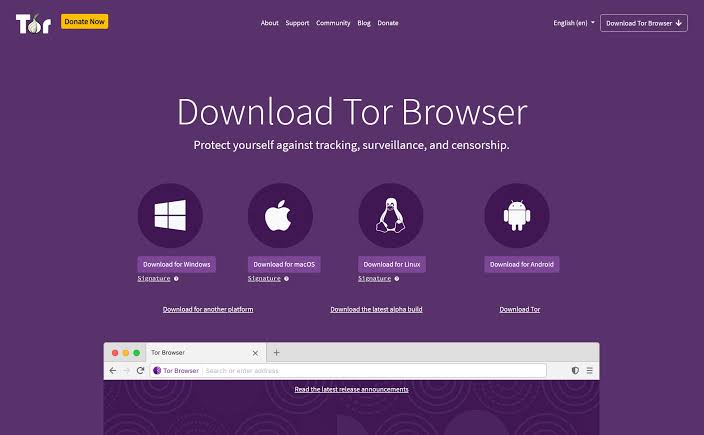
To stay safe, always download Tor Browser directly from the official Tor Project website rather than third party download sites or mirrors, since modified or outdated copies can contain malware or weakened privacy protections.Go to the official Tor Project download page.
- Choose the correct version for your operating system, Windows, macOS, Linux, or Android.
- Download the installer and verify the signature if you want an extra layer of confidence that the file has not been tampered with.
- Run the installer and choose your preferred language and installation folder.
- Launch Tor Browser and click Connect to join the Tor network. If you are in a censored region, select Configure Connection instead to set up a bridge.
- Once connected, Tor Browser opens with its default homepage, and you can begin browsing immediately.
No account creation or sign up is required at any point.
System Requirements
- Tor Browser runs on most modern computers and phones without any special hardware. As of the 15.0 release series, the browser is moving toward 64 bit only support, and the upcoming Tor Browser 16.0 will require a 64 bit processor along with Android 8.0 or later, since 32 bit Linux and older Android versions are being phased out for security and maintenance reasons. A stable internet connection is recommended, since the multi hop routing already adds some latency.
Tips for Using Tor Browser Securely
Avoid installing additional browser extensions, since they can be used to fingerprint or deanonymize you. Keep the security level set to Safer or Safest if you are dealing with sensitive activity. Do not resize the Tor Browser window, since an unusual window size can make your session easier to distinguish from others. Avoid opening downloaded documents while still connected to the internet, since some file types can reveal your real IP address even outside the browser. Always keep the application updated to the latest stable version so you receive the newest security patches as soon as they are released.
Common Limitations of Tor Browser
Tor Browser is not a magic solution for total invisibility online. Browsing speed is noticeably slower than a standard connection because of the multiple relay hops. Some websites block or challenge traffic coming from known Tor exit nodes, which can mean extra captchas or restricted access. Streaming services and some banking portals may not function correctly through Tor. Finally, anonymity only protects your network identity, not the personal information you choose to share once you are on a website.
Frequently Asked Questions
Is Tor Browser free to use?
Yes. Tor Browser is completely free and maintained by the nonprofit Tor Project, funded largely through donations and grants.
Does Tor Browser hide my IP address from every website?
Yes, websites you visit through Tor Browser see the IP address of the exit node, not your real IP address.
Can I use Tor Browser on my phone?
Yes, an official Tor Browser app is available for Android. iOS users typically rely on the Onion Browser, which is built using Tor technology and endorsed by the Tor Project.
Is Tor Browser the same as the dark web?
No. Tor Browser can access regular websites and onion sites, but it is simply a browser. The dark web refers to content hosted on hidden services, which is only one small part of what Tor Browser can reach.
Will a VPN make Tor Browser more secure?
It can add a layer of protection from your internet service provider, but it must be configured correctly, since combining the two incorrectly can sometimes reduce rather than improve your anonymity.
How often is Tor Browser updated?
The Tor Project releases updates regularly throughout the year, including emergency patches whenever critical security vulnerabilities are discovered in the underlying Firefox engine or the Tor network client.
Conclusion
Tor Browser remains one of the most effective free tools for anyone who wants real anonymity online rather than the partial privacy offered by private browsing modes or basic VPN services. Its layered encryption, volunteer operated relay network, and built in protections against tracking and fingerprinting make it a trusted choice for journalists, researchers, activists, and privacy conscious users everywhere. As long as you download it from the official source, keep it updated, and follow basic safe browsing habits, Tor Browser is a powerful way to take back control of your privacy in 2026.
